#MLX #AppleSilicon #SpeculativeDecoding This project analyzes the performance and quality trade-offs in speculative decoding using draft tokens and different quantized model configurations. It evaluates:
- ⚡ Generation speed (tokens/sec)
- 🔍 Semantic similarity (Accuracy metric) (cosine similarity via sentence embeddings)
- 📝 Text quality (Accuracy metric) (ROUGE-L score)
pip install speculative-decoding-metricsdemo/run_example.py
from speculative_decoding_metrics.main import run_evaluation

run_evaluation(
    base_model="phi-3-mini-4k-instruct",  #Use a model that'll run on your local
    main_quant="8bit",          #use q8 instead of "8bit" based on HuggingFace Repo name
    draft_quant="4bit",         #use q4 instead of "4bit" based on HuggingFace Repo name
    prompt="How do LLMs work?",
    max_tokens=64,              #Tweak max tokens per output
    num_draft_tokens_list=[0, 1, 2, 3, 4]
)
python demo/run_example.pySpeculative decoding speeds up language generation by using a smaller "draft" model to propose tokens, which are then verified by a larger "main" model.
This repo benchmarks speculative decoding using:
- Main model: Quantized to
8bit→mlx-community/<model>-8bit - Draft model: Quantized to
4bit→mlx-community/<model>-4bit
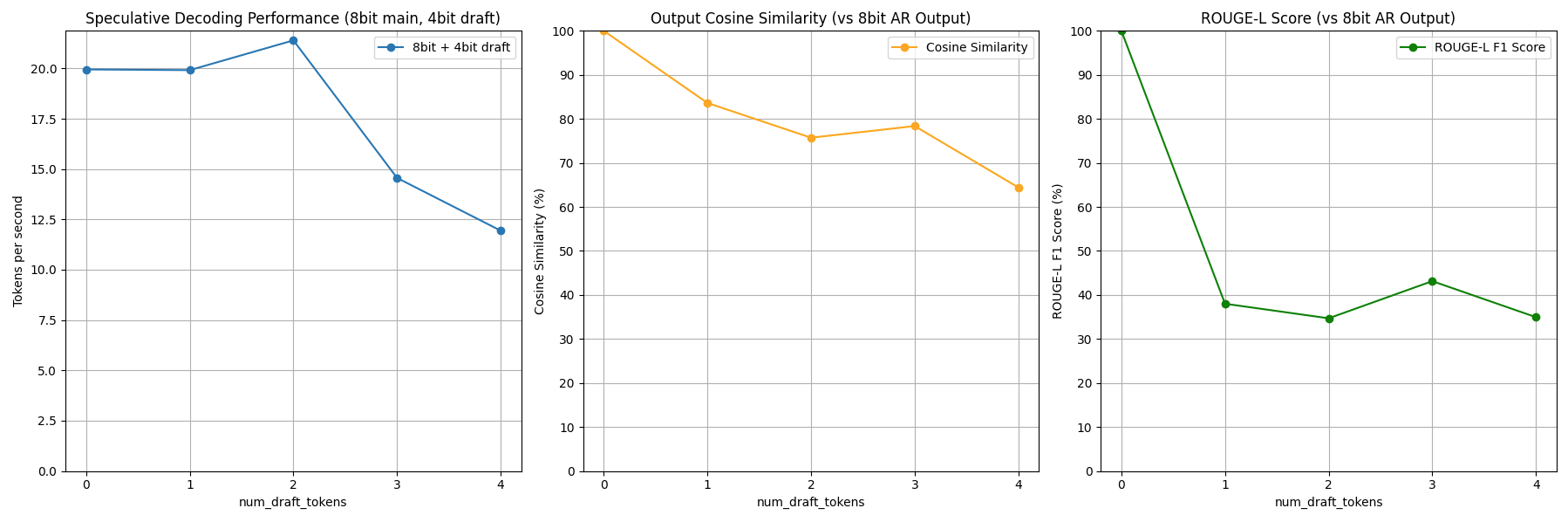
Based on these results, the user can decide which speculative decoding they want to run for the best results! This package generates plots comparing output quality and speed across draft token counts:
- Tokens/sec – Speed boost with draft tokens
- Cosine Similarity – Semantic match with baseline (no draft)
- ROUGE-L – Text overlap quality score
- 🔧 Change the prompt – Modify the
promptindemo/run_example.py - 🧠 Try other models – Swap the
base_modelstring (e.g., Mistral, TinyLlama) - 🎛️ Adjust draft token range – Modify
num_draft_tokens_listfor finer control - 📏 Set max output length – Use
max_tokensto limit generation length
- Apple MLX – Lightweight ML framework
- HuggingFace – Transformers + SentenceTransformers
- Google Research – ROUGE scoring tools