




QnA Builder is a simple, no-code way to build chatbots in Python. It provides a similarity-based conversational dialog engine, QnA Bot, which makes it easy to generate automated responses to input questions according to a set of known conversations, i.e., question-answer pairs, stored in a knowledge base. QnA Bot relies on a collection of question-answer pairs to generate answers for new inputs.
The easiest way to install the qna-builder is by using pip:
pip install qna-builderThis library is shipped as an all-in-one module implementation with minimalistic dependencies and requirements.
A QnA Bot can be set up and used in four simple steps:
- Import
QnABotclass
from qnabuilder import QnABot- Initialize a bot
bot = QnABot()- Fit the bot engine to a knowledge base
bot.fit(kb="knowledge_base.json")- Generate answers
bot.answer("Hey. What's up?")"All good. What's up with you?"
Currently, QnA Bot engine supports the following algorithms for similarity-based answer generation:
- TF-IDF Vectorization (
'tfidf') - Murmurhash3 Vectorization (
'murmurhash') - Count Vectorization (
'count')
Supported similarity metrics are as follows:
- Cosine similarity (
'cosine') - Euclidean distance (
'euclidean') - Manhattan distance (
'manhattan')
By calling run_editor() method of QnAKnowledgeBase class, the knowledge base editor window will open up in
your web browser and allows you to edit your knowledge base by adding, removing, or modifying questions/answers.
from qnabuilder import QnAKnowledgeBase

kb = QnAKnowledgeBase('my_knowledge_base.json')
kb.run_editor()
Here, you can see a screenshot of the knowledge base editor:
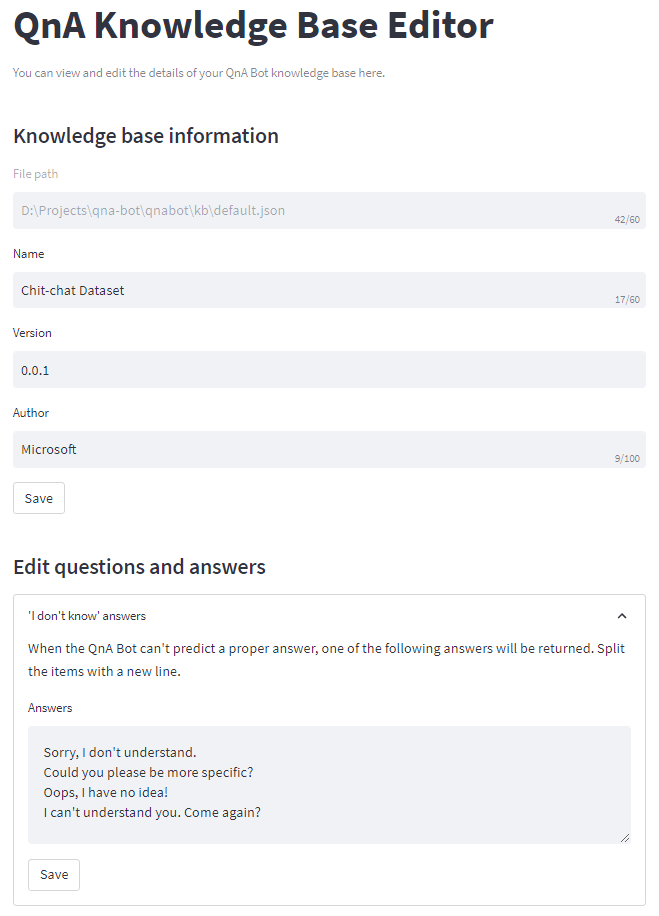
Note that you need to install the optional requirement streamlit to be able to use the knowledge base editor.
To run the tests, install development requirements:
pip install -r requirements_dev.txt
Then, run pytest:
pytest