
LMIgnite ignites your cluster with LLM deployments. It is your one-click solution to deploy high-performance, enterprise-grade LLM serving infrastructure into your own cluster and cloud environments.
LMIgnite is:
- Self-hosted: You run your LLM with your own machines. It's cheap and private.
- High-performance: We give you the best performance by deeply integrating open-source LLM projects, including inference engine (vLLM
), inter-inference-engine communication (LMCache
) and production-level orchestration (vLLM production stack
).


Feature highlights:
- 🌐 Easy-to-use: Deploy LLMs just by your browser.
- 🚀 One-click runnable: Run the bash script, and the webpage for LLM deployment will pop up for you.
- ⚡ 3-10x faster response times through our own communication library (LMCache
- 🏢 Enterprise-ready with multi-tenancy, autoscaling, and high availability
- 🔧 Wide support across clouds such as AWS, GCP, Azure, and Lambda, plus on-premises
- 📊 Built-in monitoring and performance analytics
Before you begin, make sure you have the following:
- Lambda Labs API key to connect to Lambda Cloud (the support for other clouds and self-host Kubernetes cluster is coming soon!)
- Hugging Face access token for model access
Visit the documentation on how to get them.
Currently, we support MacOS with automatic dependency installation. For users with other OS (Windows/Linux), you may need to install docker compose manually before using the following one-click script.

(Make sure you have lambda API key and huggingface token in hand)
Hit Command(⌘) + Space on your keyboard, and type terminal (or other terminal that you like), and then hit enter to launch the terminal.
Then, simply copy and paste the following command to your terminal
bash <(curl -fsSL https://raw.githubusercontent.com/LMCache/LMIgnite/refs/heads/main/install.command)This script will guide you through the installation process, and will pop up a browser for you to deploy LLMs in your own cloud!
- In the left sidebar, click Cluster, then hit + Create Cluster
- Fill in Cluster Configuration:
- Name (e.g., test)
- Cloud Provider (e.g., Lambda Labs)
- Region (e.g., us-south-1)
- GPU Type & Count (e.g., 8 × H100)
- Hugging Face Token (paste your HF access token)
- Click Create Cluster at the bottom right
- Wait until the status shows Active (Pending → init → wait_k8s → Active)
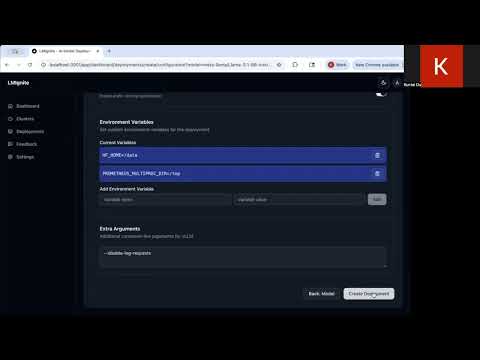
- In the left sidebar, click Deployments, then hit + Create Deployment
- Search or select from existing model cards (e.g., meta-llama/Llama-3.1-8B-Instruct)
- Configure basics:
- Deployment Name: give it a descriptive name (e.g., llama-8b-test)
- Target Cluster: select one of your Active clusters
- Click Create Deployment to quick-start, or Next: Advanced for fine control
- Monitor the deployment status progression
TBD: include the chatting and the curl request section in README and examples.
Check our online documentation for detailed explanations!
- If port 3001 is in use, you can change it in
docker-compose.yml - If cluster creation fails, try switching to a different region
- Some models on Hugging Face are "gated" and require access approval
- Check deployment logs if creation fails
We welcome contributions! Please check our documentation for development guidelines.