An alternative to ASP.NET Boilerplate
Tenant is resolved by wildcard subdomain automatically
ASP.NET Core, Entity Framework Core, Autofac, AutoMapper, PostgreSQL, NSwag, Angular 6, Bootstrap 4
If you are looking for Classic .NET edition (Full .NET Framework ASP.NET WebAPI 2) - check the repository named EixampleDotnet.
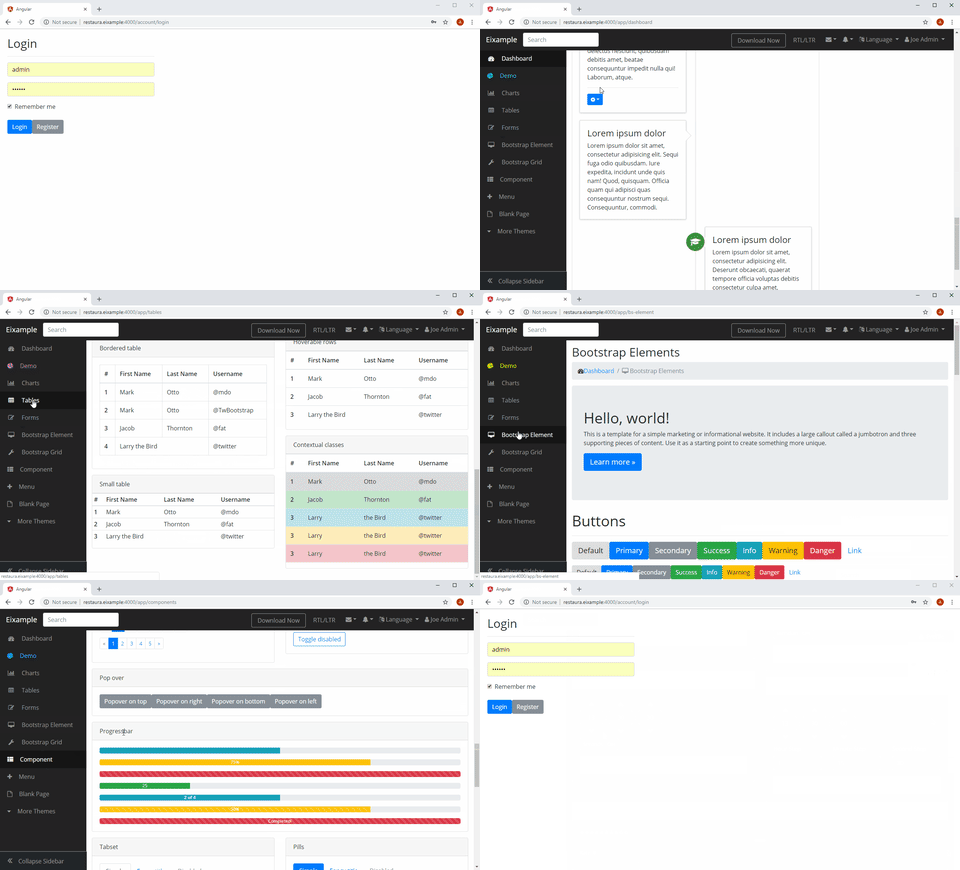
- functionality identical to ASP.NET Boilerplate reproduced in accordance with YAGNI & KISS principle
- ability to deal with pure
ASP.NET / ASP.NET Coreframework - ability to use whatever libraries you want (and related docs) - no having to deal with
Abp.*wrappers - ability to easily tweak any part of the app
- easy way of learning multi-tenant application design
Eixample is
- a building basis for multi-tenant SPA apps
- designed to be minimal and straightforward
- to be considered as unofficial Visual Studio template
Eixample does NOT
- dictate how you should code your app
- need documentation
(you only deal with native docs of the packages used by the application)
Eixample allows you
- to deal with pure
ASP.NET frameworkand design / redesign your app including the core functionality the way you like, which means more freedom and control - to upgrade original packages outright
(no extra difficulties as with upgrading from ABP 1.x.x to ABP 4.x.x.)
Back-end & front-end are stored separately.
- Multi-Tenancy
- Wildcard subdomain support (tenant resolved by subdomain automatically)
- Audit (both for EF 6.x and EF Core)
- Mapping (AutoMapper)
- Service Layer / DI (Autofac)
- PostgreSQL (snake_case names)
- SQL Server
- EF 6.x Dynamic Filters
- Soft Delete
- Seed Data
- OWIN (WebAPI 2 edition)
- NSwag / Swashbuckle (automatic HTTP proxies generation for the front-end)
- JWT Authentication
- SPA front-end (Angular)
- ng-bootstrap (Bootstrap 4)
- SB-Admin-BS4-Angular-6 template with lazy-loading
- toastr alerts (incl. exception handling)
- basic login / signup functionality
- demo functionality (demonstrates auditing for EF entities)
- one user per many tenants (as with *.stackexchange.com)
The setup is pretty straightforward if you are familiar with Entity Framework Code First approach & Node.js.
Add to hosts:
127.0.0.1       eixample
127.0.0.1       restaura.eixample
127.0.0.1       galeriasenda.eixample
Open back-end solution in Visual Studio, make sure the connection string is correct.
Go to Package Manager Console and run the following command against Entity Framework project:
Update-Database
Note that Seed Data doesn't work with SQL Server 2017 without explicitly stating DateTime fields are of datetime2 type e.g.
[Column(TypeName = "datetime2")]
Go to angular folder & run the following commands:
npm install
ng serve --host eixample --disable-host-check --port 4000
Access the website
http://restaura.eixample:4000
http://galeriasenda.eixample:4000/
Note that restaura & galeriasenda are subdomains in this case.
Default login details:
username: admin
password: 123qwe
You can of course create your own user on Register page.
Verified with:
Angular CLI: 7.1.2
Node: 10.14.1
OS: win32 x64
npm v6.4.1
As you add or modify your API controllers you need to regenerate typescript HTTP proxies for the Angular app.
- go to
./angular/nswagfolder - run
refresh.batfile ./angular/src/shared/service-proxies/service-proxies.tsgets updated
Note that we have headers.js file in ./angular/nswag folder. This script is required to amend proxies file by adding Authorization header needed for JWT Authentication.
For more info on NSwag refer the following page.
Please note that the project is decidedly lacking permission system which comes complete with ABP framework.
The reason is - there are several designs:
- roles & permissions are shared across all tenants
- each tenant has its own set of roles & permissions
- roles without permissions
- roles & permissions are not required at all
It's best not to overcomplicate the project with certain implementation.
This part is covered by ASP.NET Core docs and is completely in your hands.
On the internet you can find many tutorials covering Roles & Permissions in ASP.NET - hence no problem implementing / overriding the default functionality the way you need.
For instance - this stackoverflow post or the following thread on reddit.com.
If you are to impement the permission system - consider coding a bunch of Stored Procedures for maximum performance.
The data related to current user / session is lazy-loaded via a resolver - UserDataResolver.
app-routing.module.ts
const routes: Routes = [
    { path: '', loadChildren: './layout/layout.module#LayoutModule', canActivate: [AppRouteGuard], resolve: { resolver: UserDataResolver } },
See app-routing.module.ts, user-data-resolver.ts, user-data.service.ts for more info.
The shared service UserData is injected into other components interested in user / session data.
As mentioned above - when Roles & Permissions are implemented you can pass related info to front-end in this hook. Thus we are replicating the following part of ABP section Client Side (JavaScript).
The currently used template is titled SB-Admin-BS4-Angular-6.
Note that you're not limited by it in any way - if you have experience with Angular you can switch to any other template no matter what it is based on - be it ng-boostrtap or Angular Material or any other framework.
As you already might have guessed nothing stops you from dropping Angular and implement your front-end using Vue.js, React, etc.
-
install
PostgreSQLanddotnet-sdk -
go to
eixample.EntityFrameworkCoreand run
dotnet ef database update
- go to
eixample.Hostand run
sudo dotnet publish --configuration Release
A concise tutorial can be found here.
filename: kestrel-eixample.service
[Unit]
Description=Eixample

[Service]
WorkingDirectory=/home/user1/development/eixample/aspnet-core/eixample.Host/bin/Release/netcoreapp2.1/publish
ExecStart=/usr/bin/dotnet /home/user1/development/eixample/aspnet-core/eixample.Host/bin/Release/netcoreapp2.1/publish/eixample.Host.dll
Restart=always
# Restart service after 10 seconds if the dotnet service crashes:
RestartSec=10
SyslogIdentifier=dotnet-eixample
User=www-data
Environment=ASPNETCORE_ENVIRONMENT=Production
Environment=DOTNET_PRINT_TELEMETRY_MESSAGE=false

[Install]
WantedBy=multi-user.target
filename: angular-eixample.service
[Unit]
Description=Angular Eixample

[Service]
WorkingDirectory=/home/user1/development/eixample/angular
ExecStart=/bin/sh -c "/home/user1/.npm-global/bin/ng serve --host eixample --disable-host-check --port 4000"
Restart=always
# Restart service after 10 seconds if the dotnet service crashes:
RestartSec=10
SyslogIdentifier=dotnet-eixample-frontend
User=www-data
Environment=ASPNETCORE_ENVIRONMENT=Production
Environment=DOTNET_PRINT_TELEMETRY_MESSAGE=false

[Install]
WantedBy=multi-user.target


