5. Superset
PyDynamoDB already integrated into Superset latest version. You can read more here.
The connection string for superset have to add a special parameter in query string connector=superset. Like this:
dynamodb://{aws_access_key_id}:{aws_secret_access_key}@dynamodb.{region_name}.amazonaws.com:443?connector=superset
If you are using local dynamodb for test purposes, it's required to add endpoint_url parameter to point to endpoint of local ddb. Like this:
dynamodb://dummy:dummy@dynamodb.us-east-1.amazonaws.com:443?connector=superset&endpoint_url=http://localhost:8000
- Install PyDynamoDB>=0.4.2 in Superset environment.
- Add a new Database Connection in "Databases" page. Place the connection string in "SQLALCHEMY URI" textbox.
- Use "ADVANCED" > "Other" > "ENGINE PARAMETERS" for adding additional parameters, like this:
{"connect_args":{"role_arn":"<role arn>",...}} - Open "SQL Lab" > "SQL Editor", choose the database created in the previous step.
- Write SQL in the editor.
- Create Chart based on the query
- DON'T use wildcard * in the columns. It will bring unpredictable dataset)
- Use Type Annotation Functions (DATE, DATETIME, NUMBER, BOOL) in the SQL to convert data to the proper type. Otherwise, Superset can't identify the data type of the dataset.
SELECT col_str, DATE(col_date), DATETIME(col_datetime),
       NUMBER(col_int), NUMBER(col_float)
FROM Issues WHERE key_partition='key1'DynamoDB doesn't support most of aggregation functions which are common in the current RDBMS, like MIN, MAX, SUM. To support these features, PyDynamoDB use core driver module to get data from DDB and write into a QueryDB (SQLite3 Memory DB by default), then pass the query SQL from Superset to QueryDB to get back final dataset.
Please refer to the architecture below:
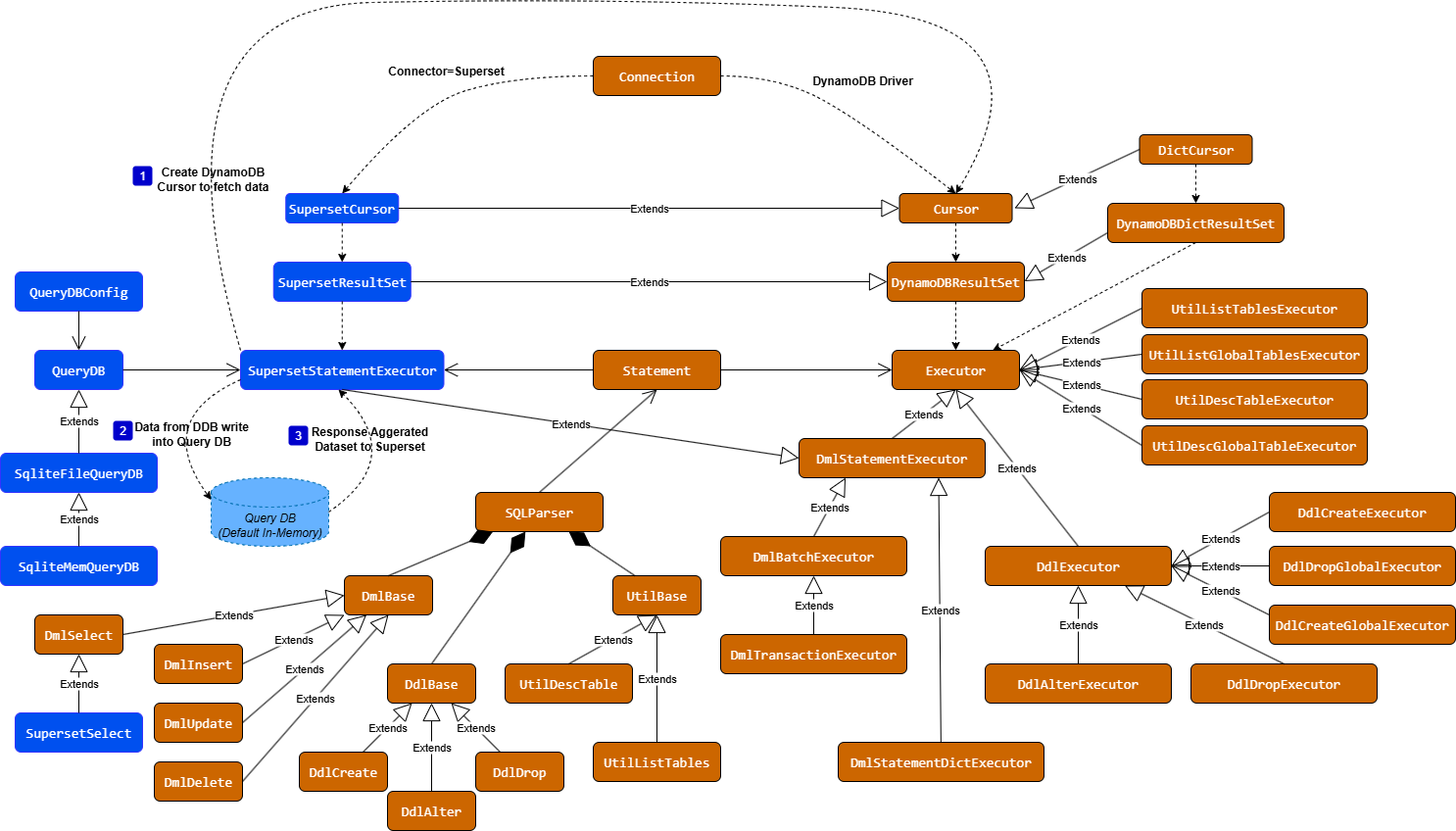
This feature enables you to utilize the advanced querying capabilities and functions of QueryDB to perform secondary processing on data retrieved from DynamoDB. You can construct a two-level SQL query, consisting of an outer and an inner query. The inner query fetches raw data from DynamoDB, while the outer query executes SQL operations within QueryDB. This approach allows you to apply any functions or operations supported by QueryDB in the outer query statement.
SELECT col1, SUBSTR(col1, INSTR(col1, '*')), col2, col3 FROM (           # Outer Query: execute on QueryDB
    SELECT ddb_col1 col1, NUMBER(ddb_col2) col2, DATETIME(ddb_col3) col3 # Inner Query: execute on DynamoDB
    FROM DDB_TABLE WHERE ddb_col1 = *
) WHERE col1 = *
Tips: If there are special characters like "[", "]" in the column names of the inner query, they will be internally replaced with column names that comply with most relational database standards. Therefore, it's best to use aliases for such columns.
You could use SQLite DB with file model. With this model, cache will be enabled by default to improve query performance. Tips: In-memory model won't trigger cache. If want to use this model, you have to set below parameters in environment variable.
# Sqlite by default. If customized QueryDB, set PYDYNAMODB_QUERYDB_CLASS
PYDYNAMODB_QUERYDB_TYPE=sqlite
# Customized QueryDB Class if not sqlite. (Available from 0.4.4)
PYDYNAMODB_QUERYDB_CLASS=module_name:class_name
# QueryDB URL. If sqlite is specified, :memory: or path/to/query.db set here
PYDYNAMODB_QUERYDB_URL=path/to/query.db
# Batch size when data load into QueryDB
PYDYNAMODB_QUERYDB_LOAD_BATCH_SIZE=200
# Expired time of data (seconds)
PYDYNAMODB_QUERYDB_EXPIRE_TIME=30
# Enable data purge for QueryDB
PYDYNAMODB_QUERYDB_PURGE_ENABLED=true
# Purge data if exceed the purge time (seconds)
PYDYNAMODB_QUERYDB_PURGE_TIME=86400
It can support more databases extension. Just need to extend QueryDB class to implement all @abstractmethod. Here is a sample of Customized QueryDB class:
from pydynamodb.superset_dynamodb.querydb import QueryDB

class CustomQueryDB(QueryDB):
    def __init__(
        self,
        statement: Statement,
        config: QueryDBConfig,
        **kwargs,
    ) -> None:
        super().__init__(statement, config, **kwargs)
        self._connection = None

    # Please return connection object with DB API 2.0 compliant
    # DB API 2.0 (PEP 249): https://www.python.org/dev/peps/pep-0249/
    @property
    def connection(self):
        if self._connection is None:
            self._connection = xxdb.connect(self.config.db_url)

        return self._connection

    # Provide the mapping of python type and database data type for DB specified.
    def type_conversion(self, type: Type[Any]) -> str:
        type_mapping = {
            str: "VARCHAR",
            int: "INTEGER",
            float: "FLOAT",
            bytes: "VARCHAR",
            bool: "INTEGER",
            datetime: "TIMESTAMP",
            date: "DATE",
        }

        return type_mapping.get(type, "VARCHAR")

    # Check if table is existing or not based on DB specified
    def has_table(self, table: str) -> bool:
        return self.connection.has_table(table)