A modern, feature-rich web calculator built with pure HTML5, CSS3, and Vanilla JavaScript (ES6+). This project showcases professional frontend development practices with Object-Oriented Programming, modern UI/UX design, and advanced features.
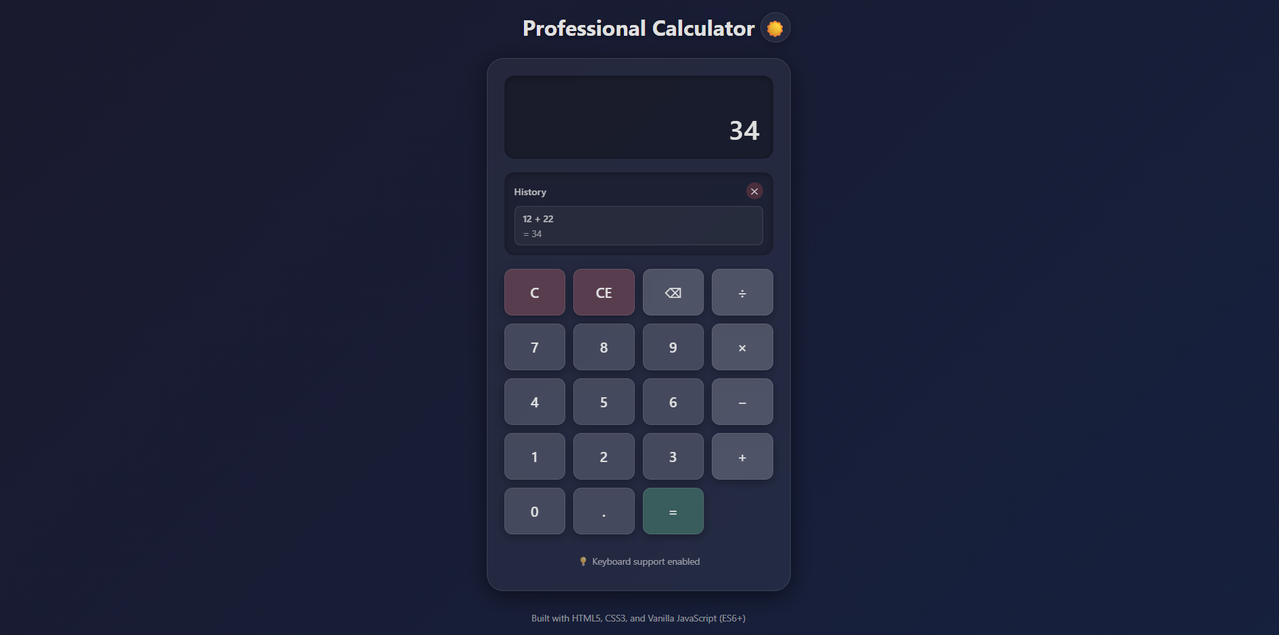
- Glassmorphism UI: Beautiful frosted glass effect with backdrop blur
- Dark/Light Mode: Automatic theme switching based on system preferences with manual toggle
- Fully Responsive: Optimized for all screen sizes (desktop, tablet, mobile)
- Smooth Animations: Elegant transitions and hover effects for enhanced user experience
- Full keyboard navigation support
- Number keys (0-9) for input
- Operators:
+,-,*,/ Enteror=for calculationEscapeorCto clearBackspaceto delete last digit
- Calculation History: View and reuse the last 5 calculations
- Error Handling: Graceful handling of division by zero and number overflow
- Decimal Precision: Smart formatting for long decimal numbers
- Expression Display: Shows current calculation expression
- Object-Oriented Programming: Clean Calculator class architecture
- Separation of Concerns: Logic separated from UI
- JSDoc Documentation: Comprehensive code documentation
- Accessibility: ARIA labels and semantic HTML
- Modern ES6+ Syntax: Arrow functions, classes, const/let
- A modern web browser (Chrome, Firefox, Safari, Edge)
- No build tools or dependencies required!
-
Clone or download the repository
git clone <repository-url>
cd web-calculator
-
Open the project
- Simply open
index.htmlin your web browser - Or use a local development server:
# Using Python
python -m http.server 8000

# Using Node.js (http-server)
npx http-server

# Using PHP
php -S localhost:8000
- Simply open
-
Access the calculator
- Open
http://localhost:8000in your browser - Or double-click
index.htmlto open directly
- Open
web-calculator/
│
├── index.html          # Main HTML structure
├── style.css           # Glassmorphism styles and themes
├── script.js           # Calculator class and logic
└── README.md           # Project documentation
- Click number buttons or use keyboard to input numbers
- Click operator buttons (
+,-,×,÷) or use keyboard - Click
=or pressEnterto calculate - Click
Cor pressEscapeto clear
- History: Click on any history item to reuse its result
- Theme Toggle: Click the moon/sun icon to switch themes
- Clear History: Click the
✕button in history section
| Key | Action |
|---|---|
0-9 |
Input numbers |
. or , |
Decimal point |
+ |
Addition |
- |
Subtraction |
* |
Multiplication |
/ |
Division |
Enter or = |
Calculate |
Escape or C |
Clear all |
Backspace |
Delete last digit |
The calculator is built using Object-Oriented Programming with a main Calculator class that handles:
- State Management: Current value, previous value, operator
- Calculation Logic: All mathematical operations
- Display Updates: UI synchronization
- History Management: Storing and displaying calculation history
- Theme Management: Dark/light mode switching
- Event Handling: Button clicks and keyboard input
// Number input
handleNumber(number)

// Operator input
handleOperator(operator)

// Perform calculation
performCalculation()

// Clear calculator
clear()

// Add to history
addToHistory(expression, result)The design uses modern glassmorphism principles:
- Semi-transparent backgrounds
- Backdrop blur effects
- Subtle borders and shadows
- Layered depth perception
- Light Mode: Purple gradient background with white glass effects
- Dark Mode: Dark blue gradient with subtle glass effects
- Automatic theme detection based on system preferences
- Mobile-first approach
- Flexible grid layout
- Touch-friendly button sizes
- Optimized for all screen sizes
The calculator gracefully handles:
- Division by Zero: Shows error message and prevents calculation
- Number Overflow: Handles very large numbers with scientific notation
- Long Decimals: Smart truncation and formatting
- Invalid Input: Prevents multiple decimal points and invalid operations
In script.js, modify the maxHistoryLength property:
this.maxHistoryLength = 5; // Change to desired numberModify maxDisplayLength in the Calculator constructor:
this.maxDisplayLength = 15; // Maximum characters displayedEdit CSS variables in style.css:
:root {
    --bg-primary: linear-gradient(135deg, #667eea 0%, #764ba2 100%);
    /* Customize colors here */
}- ✅ Chrome (latest)
- ✅ Firefox (latest)
- ✅ Safari (latest)
- ✅ Edge (latest)
- ✅ Mobile browsers (iOS Safari, Chrome Mobile)
To test the calculator:
- Test all basic operations (+, -, ×, ÷)
- Test decimal calculations
- Test division by zero (should show error)
- Test keyboard input
- Test history functionality
- Test theme switching
- Test responsive design on different screen sizes
All methods are documented with JSDoc comments:
- Method descriptions
- Parameter types and descriptions
- Return value types
- Private method indicators
Potential features for future versions:
- Scientific calculator mode
- Memory functions (M+, M-, MR, MC)
- Percentage calculations
- History export/import
- Custom themes
- Sound effects
- Unit conversions
This project is licensed under the MIT License - see the LICENSE file for details.
This project is open source and available for portfolio use.
Built as a portfolio project showcasing:
- Modern JavaScript (ES6+)
- Object-Oriented Programming
- CSS3 Advanced Features
- Responsive Design
- Accessibility Best Practices
- Clean Code Architecture
- Pablo.ejs (@ps-xx) - Developer
- Design inspiration from modern UI/UX trends
- Glassmorphism design pattern
- Accessibility guidelines (WCAG)
Enjoy calculating! 🎉