A rendezvous/relay server for the open-source remote desktop software RustDesk (https://github.com/rustdesk/rustdesk), written in Go.
Only the necessary functionality to connect clients is implemented. There are no extra features such as those offered by the official RustDesk server (https://github.com/rustdesk/rustdesk-server).
If you want to test the server yourself, you can follow the steps below:
- Allow TCP on ports 21115-21117 and UDP on port 21116
-
Download or clone this repository on your local machine
-
Install Go if you don't have it
-
Build the executable for the correct OS and CPU architecture
-
Find out which
GOOSandGOARCHvalues correspond to your VM's OS and CPU architecture -
Most likely you will be compiling for
linuxandamd64 -
Assuming you are in the
go-rustdesk-server/directory, execute the following commandsgo run ./cli/keygen go run ./cli/compile linux amd64
-
As a result of these commands, a
dist/directory will be created atgo-rustdesk-server/dist/ |—— keys.env |—— (compiled executable for target platform)
-
-
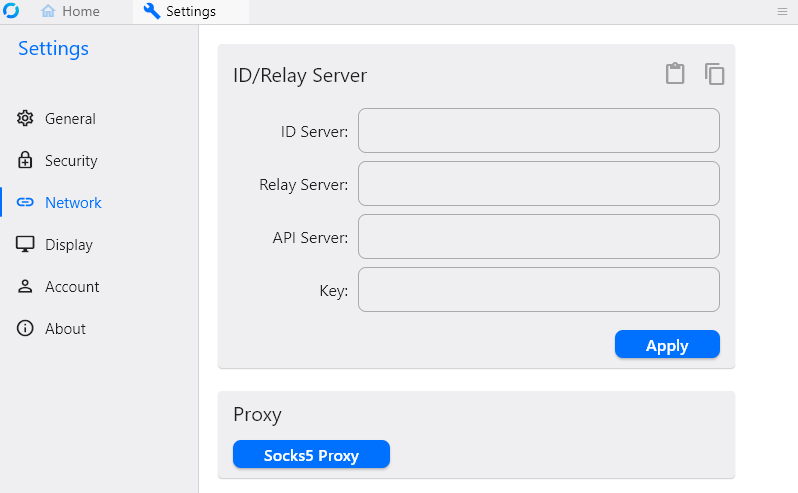
On each client, open the RustDesk network settings
-
Set the "ID server" and "Relay server" fields to your VM's public IP address (e.g. 142.250.190.14)
-
Before setting the "Key" field, you first need to open the
keys.envfile that was generated atdist/in the previous stepPRIVATE_KEY="some_base64_encoded_private_key" PUBLIC_KEY="some_base64_encoded_public_key" -
Back in the network settings, set the "Key" field to the PUBLIC_KEY (without the quotation marks)
-
You can use a tool like
scpscp keys.env <executable> user@remote_host:/home/user/my-server/ -
The files must be placed in the same directory
-
Assuming you are on Linux and positioned in the same directory as the executable
chmod +x serverto makeserverexecutable./server rendezvousto run the rendezvous server./server relayto run the relay server