
Welcome to Py.word Game, a Python-based password creation and validation game! This project was created as a submission by r._.uiz for the CS50P course offered by Harvard University, heavily inspired by neal.fun's version.

- Author: r._.uiz
- GitHub Profile: r._.uiz on GitHub
Trying to up your account security? Look no further. These curious rules for a password will surely be enough. Heavily inspired by The Password Game by neal.fun, Py.word Game is a password creation and validation game that challenges users to create a secure password while following unique a set of rules.
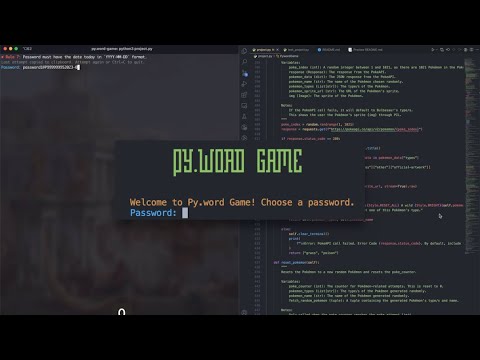

Py.word Game by r-uiz | YouTube
Created to fulfill the requirements for Harvard's CS50P, a Computer Science course focused on Python.
- This is my first Python program, so I apologize for any bad practices.
- Feel free to leave any feedback on how I can improve my code!
This project relies on the following pip-installable libraries, which is listed one per line in a requirements.txt file in the root of the directory:
pyperclip
requests
pillow
colorama
captcha
Don't ruin the fun! Play the game first before reading this section ;)
The Py.word Game enforces the following requirements for a valid password:
- Password must be at least
5characters long (configurable). - Password has a
50character limit (configurable). - Password must include a
number. - Password must contain a
specialcharacter andno whitespace. - Password must contain an
uppercaseletter. - The digits in your password must add up to
69(configurable). - Password must have the date today in
YYYY-MM-DDformat. - Password must include at least one of a randomly generated Pokémon's
type. - Password must include the regenerating code in the
captcha.png/captcha.wavin the same directory as this program. - Password must have the
flag emojiof a country whose name/country code starts with the letterP. - Password must include the
monthwe're currently in. - Password must have a
food emoji. - Password must include the current time in
HH:MMmilitary time format.
If the password doesn't follow a rule, the user will be prompted to try again until all requirements are met, or until the user quits the program.
- To get started with the Py.word Game, you'll need a Python environment set up on your computer.
- Clone the repository to your local machine:
git clone https://github.com/r-uiz/py.word-game.git- Navigate to the project directory
cd py.word-game- Install the required libraries by running the following command:
pip install -r requirements.txt- Run the Py.word Game:
python project.py
-
Follow the on-screen instructions to create a password that meets all the specified rules.
-
Attempts will be copied to your clipboard for easy re-entry.
If you want to disable this, you can comment out the
pyperclip.copy()lines in the source code. -
Once you successfully create a valid password, the game will display a success message along with the time you took to complete the game.
- If you encounter any errors while running the program, please open an issue or submit a pull request.
- If it raises a NotImplementedError:
- You may get an error message that says: “Pyperclip could not find a copy/paste mechanism for your system. Please see https://pyperclip.readthedocs.io/en/latest/introduction.html#not-implemented-error for how to fix this.”
- This will also happen if project is run in a CS50 codespace, which runs without a GUI. If you run it locally using the instructions in the Installation section, it should work.
- This is because Pyperclip works by accessing the clipboard of your computer, and different operating systems have different ways of accessing that clipboard. The link in the error message will provide you with instructions on how to fix this issue.
-
min_length_reqs- Uses the
len()function to check if the length of the password is more than or equal to a configurable default value of 5. Rule 1.
- Uses the
-
max_length_reqs- Uses the
len()function to check if the length of the password is less than or equal to a configurable default value of 50. Rule 2.
- Uses the
-
has_number_reqs- Uses the
any()function to check if any of the characters in the password is a number. Rule 3.
- Uses the
-
has_special_reqs- Uses the
any()function to check if any of the characters in the password is a special character and theisspace()function to check if any of the characters in the password is a whitespace. Rule 4.
- Uses the
-
has_upper_reqs- Uses the
any()function to check if any of the characters in the password is an uppercase letter. Rule 5.
- Uses the
-
sum_reqs- Iterates through each character in the password, assessing if it is a digit, and adding it to a configurable expected value of
self.sum_targetwhich defaults to69. Rule 6.
- Iterates through each character in the password, assessing if it is a digit, and adding it to a configurable expected value of
-
date_today_reqs- Uses the
datetimelibrary to get the current date and formatting it toYYYY-MM-DDstr format, and checking if it is in the password. Rule 7.
- Uses the
-
fetch_random_pokemon- Uses the
requestslibrary to fetch arandomPokémon from the PokéAPI gets itsname,typelist, andsprite. Pops up its sprite with the default image viewer, and return's the chosen Pokémon's name and type/s. Defaults toBulbasaurvalues if API call fails. Rule 8.
- Uses the
-
reset_pokemon- Resets the Pokémon counter to 0, and fetches a new Pokémon with
fetch_random_pokemon. Used when the configurable default value of 3 is reached. Rule 8.
- Resets the Pokémon counter to 0, and fetches a new Pokémon with
-
wild_pokemon_reqs- Main validator that calls
fetch_random_pokemonon first initialization, andreset_pokemonif the configurable default value of 3 is reached. Uses theany()function to check if any of the Pokémon's types are in the password. Rule 8.
- Main validator that calls
-
generate_captcha- Uses the
stringlibrary to generate and return a captcha code with the configurable default values ofstring.ascii.lowercaseandstring.digits. Rule 9.
- Uses the
-
generate_audio_captcha- Uses the
captchalibrary to generate an audio captcha with the returned value ofgenerate_captcha. Writes the audio captcha to captcha.wav. Rule 9.
- Uses the
-
generate_image_captcha- Uses the
captchalibrary to generate an image captcha with the returned value ofgenerate_captcha. Writes the image captcha to captcha.png. Rule 9.
- Uses the
-
reset_captcha- Resets the captcha counter to 0, and generates a new captcha with
generate_captcha. Used when the configurable default value of 5 is reached. Rule 9.
- Resets the captcha counter to 0, and generates a new captcha with
-
captcha_reqs- Main validator for captcha rules, and
reset_captchaif the configurable default value of 5 is reached. Rule 9.
- Main validator for captcha rules, and
-
flag_reqs- Checks if any character of the password is in the validFlag.txt file. Rule 10.
-
month_reqs- Uses the
datetimelibrary to get the current month and formatting it to the full name str format, and checking if it is in the password. Rule 11.
- Uses the
-
food_reqs- Checks if any character of the password is in the validFood.txt file. Rule 12.
-
time_now_reqs- Uses the
datetimelibrary to get the current time and formatting it toHH:MMmilitary time str format, and checking if it is in the password. Rule 13.
- Uses the
-
validate- Calls all the above
reqsfunctions to validate the password. Returns True if all requirements are met, and False if not.
- Calls all the above
-
confirm- If input is finally valid, this is called to reset user's clipboard & start a timer. If user's manually-inputted password is the same as the previously valid password, and before the configurable default value of 30 seconds, returns True. If not the same or time elapsed is over 30 seconds, returns False.
-
format_elapsed_time- Formats the elapsed time float to a readable natural-language format using
timedelta. Returns the formatted string.
- Formats the elapsed time float to a readable natural-language format using
-
clear_terminal- Clears the terminal screen to make the game more readable and less cluttered of the constant prompts.
-
__init__- Initializes the game with configurable default values seen in Configurable Default Variables.
-
main- Main game loop that introduces the game and asks for input of which will be tested against the requirements in
validate. If valid, will ask for confirmation withconfirm. Also handles the Ctrl+CKeyboardInterruptexception andpyperclipclipboard copying.
- Main game loop that introduces the game and asks for input of which will be tested against the requirements in

self.captcha_options- Configurable default value for the
generate_captchafunction. Defaults tostring.ascii.lowercase+string.digits.
- Configurable default value for the
self.captcha_range- Configurable default value for the
generate_captchafunction. Defaults to 5.
- Configurable default value for the
self.captcha_attempt_limit- Configurable default value for the
captcha_reqsfunction. Defaults to 5.
- Configurable default value for the
self.poke_attempt_limit- Configurable default value for the
wild_pokemon_reqsfunction. Defaults to 3.
- Configurable default value for the
self.min_length- Configurable default value for the
min_length_reqsfunction. Defaults to 5.
- Configurable default value for the
self.max_length- Configurable default value for the
max_length_reqsfunction. Defaults to 50.
- Configurable default value for the
self.sum_target- Configurable default value for the
sum_reqsfunction. Defaults to 69.
- Configurable default value for the
self.confirm_time_limit- Configurable default value for the
confirmfunction. Defaults to 30 seconds.
- Configurable default value for the
pyperclip- Used to copy attempt to the user's clipboard for easier input in the loop, and to reset the clipboard once on the confirmation stage.
requests- Used to fetch a random Pokémon from the PokéAPI required by Rule 8.
pillow- Used to display the Pokémon's sprite with the default image viewer required by Rule 8.
colorama- Used to color the text outputted to the terminal.
captcha- Used to generate the captcha code and audio/image captcha files required by Rule 9.
os- Used to clear the terminal screen.
sys- Used to exit the program.
time- Used to calculate the elapsed time in the
confirmfunction and total elapsed time in themainfunction.
- Used to calculate the elapsed time in the
string- Used to generate the captcha code in the
generate_captchafunction.
- Used to generate the captcha code in the
random- Used to generate the captcha code in the
generate_captchafunction and to choose a random Pokémon in thefetch_random_pokemonfunction.
- Used to generate the captcha code in the
readline- Used for easier input editing in the terminal.
io- Used to generate the captcha files in the
captchafunctions.
- Used to generate the captcha files in the
pathlib- Used to get the current directory of the program.
datetime- Used to get the current date and time in related
time/datefunctions, andtimedelta.
- Used to get the current date and time in related
- add a visual for the timer in the time requirement for the confirm function (maybe a progress bar?)
- add functionality to disable colored text outputting (using argparse, for example)
- with this, add configurability flags for any default values (like the max length of the password, number of tries for captcha, etc.)
- completely disable clipboard pasting in confirm function (Can just be pasted again if you have a clipboard manager)
- In my terminal I could also just press the up arrow key to get the previous input, so maybe disable that too?
- add more rules! see below
- Hopefully more that requires user to search for a solution (like the pokemon one) on the Internet like neal.fun's version. (Chess notation, Geoguessr, etc.)
- Even more interactive ones.
- Finish unit test file (Pokémon and captcha tests are incomplete. Mainly because of lack of knowledge on how to test them since they include API Calls and file generation)
- add a GUI for easier input and prettier overall. Check out: tkinter or PyQt
Retype the valid password to confirmadded!add numbers to captcha (fun lil challenge, bit of an annoyance but its a game, no?)added!lower max limit (might be too limiting)configurable!- include total length of password (will mess with current answers in int-based reqs)
- must include a palindrome that has a minimum of 5 characters and is not a number.
- With a set of ten letters, must include a valid word that uses some of the letters given. Regenerates new set every time you get it wrong. (easier reset if impossible to make word)
- give broken code. add the needed solution to the password
- randomly generate a Terminal chess board and ask for a best move (maybe use chess notation)
- randomly generate emoji set and ask for what movie it means (🚢🧊💔 = Titanic)
- Hmm... needs more RGB. Add emojis that are red, green, and blue. (🔴🟢🔵)
-
Int-based requirements, especiallyRule 6: SumandRule 13: HH:MMare quite the hassle later on (that's the point; should be a challenge) But I understand your struggle! (hell, imagine testing the code for yourself!); this tool that I wrote (which is basically thesum_reqsfunction) would be useful just so editing attempts in real time would be less of a hassle since these requirements mingle, and you'll be out of the terminal. -
Best to add the emojis in the beginning of the string. It's a hassle to use the arrow keys when passing over country flags and other emoji since it modifies it visually and turns out your cursor is not at right spot. (I'm not sure if this is a problem with my terminal or the code itself, but it's a problem nonetheless)
-
Emojis may not necessarily be 1 character, which will be confusing for the char limit functions.
You are welcome to contribute to this project by providing feedback or suggestions for improvement. If you encounter any issues or have ideas for enhancements, please open an issue or submit a pull request.
- Fork the repository.
- Create a new branch for your feature or bug fix:
git checkout -b feature-name. - Make your changes and commit them:
git commit -am 'Add feature'. - Push to the branch:
git push origin feature-name. - Create a pull request.