A lightweight compose-like dev workflow tool for services and tasks.
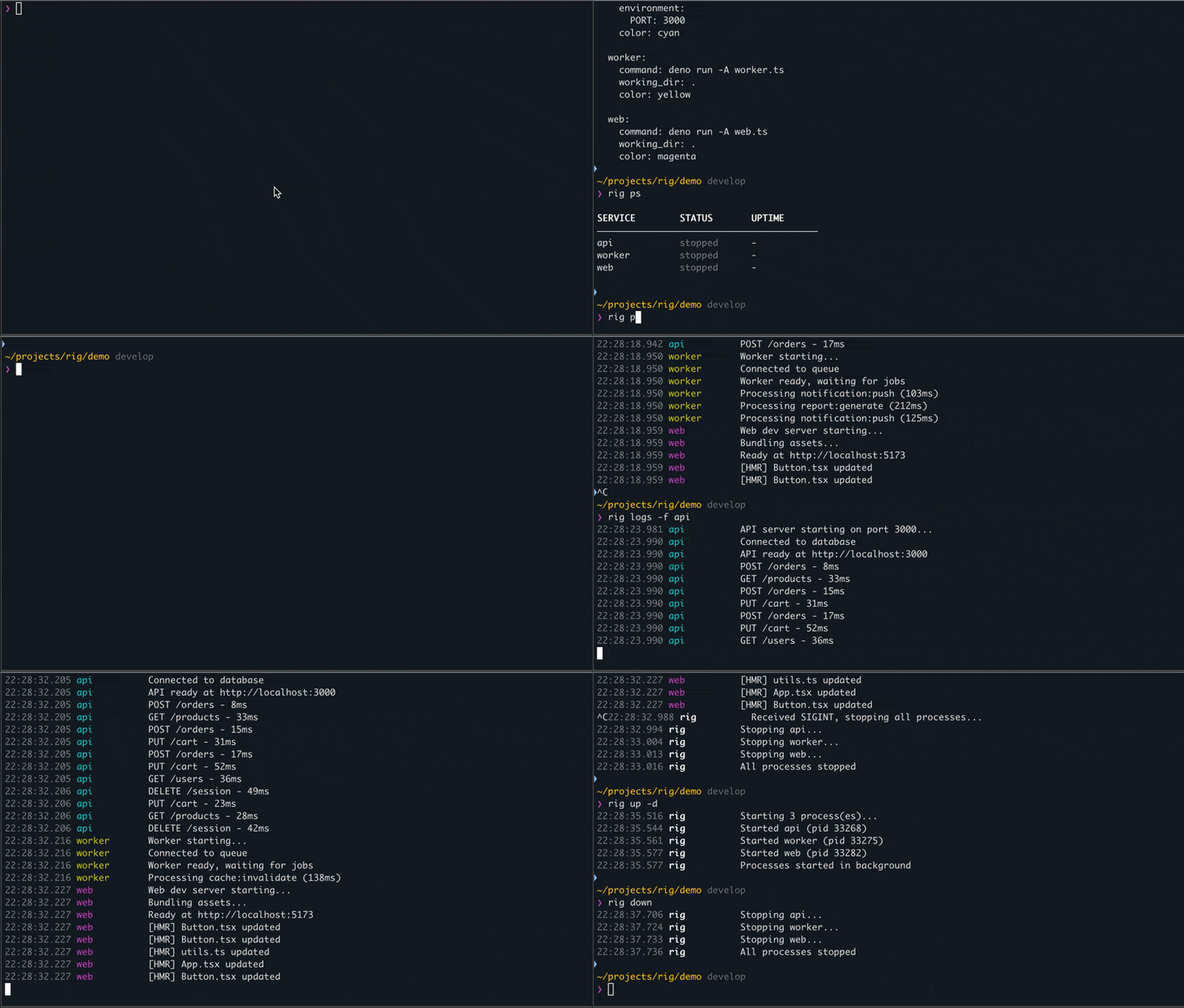
Services - long-running processes via tmux:
rig up        # Start all services, stream logs (Ctrl+C stops all)
rig up -d     # Start in background (detached)
rig down      # Stop all services (graceful)
rig ps        # Show status
rig logs -f   # Follow logs
Tasks - one-off commands:
rig tasks                           # List all tasks
rig run backend.build               # Run a group-level task
rig run backend.api.test            # Run a service-level task
rig run backend.api.test -- --ci    # Pass args to task via --
rig run api.test web.test db.test   # Run multiple tasks sequentially
rig run api.test web.test -p        # Run tasks in parallel
Services run in tmux sessions - they survive terminal close and can be reattached. Tasks execute directly - they pass through stdin/stdout and exit codes.
Smoother dev workflow when working with many services, apps, and commands - without having to delegate everything to docker.
- Simple config - one yaml or multiple that compose via imports
- No state, no runtime - tmux is the only dependency, no daemon running
- Survives terminal close - tmux keeps services running, come back anytime
- Optional file watching - services auto-restart when code changes
- Supports monorepo workflows - run from any subdirectory, configs compose via imports
- Runs anything - npm, deno, cargo, docker, scripts - doesn't matter
- Greppable file logs - logs persist to disk, easy to search for you or agents
- Quick inspection - see resource usage and ports at a glance
- Fast project switching - spin up/down entire setups when switching between projects
- Deploy-aligned env vars - in config or external files, no dotenv in code, same pattern as production
Install or upgrade (macOS, Debian/Ubuntu, Fedora, Arch):
curl -fsSL https://raw.githubusercontent.com/roelentless/rig/develop/install.sh | shChecks what's missing, shows the install plan, asks before running anything. Safe to re-run for upgrades.
Prerequisites: deno (2.5+), tmux, fd, watchexec
# macOS
brew install tmux deno fd watchexec

# Linux (Debian/Ubuntu)
sudo apt install tmux fd-find
curl -fsSL https://deno.land/install.sh | sh
# watchexec: install .deb from https://github.com/watchexec/watchexec/releases

# Linux (Fedora)
sudo dnf install tmux fd-find
curl -fsSL https://deno.land/install.sh | sh
# watchexec: install .rpm from https://github.com/watchexec/watchexec/releases

# Linux (Arch)
sudo pacman -S tmux fd watchexec
curl -fsSL https://deno.land/install.sh | sh
Install or upgrade rig:
deno install -Agf -n rig --reload=https://jsr.io/@roelentless/rig jsr:@roelentless/rigEnsure ~/.deno/bin is in your PATH.
Create rig.yaml somewhere:
groups:
  backend:
    services:
      db:
        command: docker run --rm -p 5432:5432 postgres:16
        working_dir: .
        healthcheck:
          grace_ms: 1000

      api:
        command: deno run -A server.ts
        working_dir: ./backend
        environment:
          PORT: 3000
        depends_on: [db]
        tasks:                           # Service-level tasks
          test:
            command: deno test -A
          build:
            command: deno compile -A -o dist/api server.ts
            description: Compile to binary

    tasks:                               # Group-level tasks
      deploy:
        command: ./scripts/deploy.sh
        working_dir: .
        description: Deploy backend

  frontend:
    services:
      web:
        command: npm run dev
        working_dir: ./frontend
See example/ for a working config with all features, and example/cli-log.md for real command output.
rig - lightweight dev workflow tool for services and tasks

USAGE:
  rig <command> [options] [services...]

SERVICES:
  init                      Create rig.yaml in current directory
  start/up [services...]    Start processes (foreground, streaming logs)
  start/up -d [services...] Start processes in background (detached)
  stop/down [services...]   Stop processes (graceful)
  kill [services...]        Force kill with SIGKILL
  restart [services...]     Restart processes
  ps/list [-f|--full]       Show status (add -f for mem/cpu/ports)
  top                       Live dashboard with auto-refreshing metrics
  logs/tail [-f] [--prev] [service]  Show logs (--prev for last run)
  config [--raw|--json] [services...] Show config (--raw for YAML, --json for JSON)

TASKS:
  tasks [--group <name>]           List all tasks
  run/task <task...> [-- args...]  Run task(s) (group.name or group.service.name)
    -p, --parallel                 Run tasks in parallel

MULTI-FILE:
  discover [--dry-run] [--yes] [path]  Scan for rig files and update imports

OTHER:
  version                   Show version
  help                      Show this help

OPTIONS:
  -g, --group <name>        Target entire group(s) instead of services
  -v, --verbose             Enable verbose logging for debugging

EXAMPLES:
  rig up                    Start all processes (all groups)
  rig up -d                 Start all in background
  rig start api worker      Start specific services
  rig start -g backend      Start all services in backend group
  rig down                  Stop all processes (graceful)
  rig stop -g backend       Stop all services in backend group
  rig kill                  Force kill all processes
  rig restart -g backend    Restart entire group
  rig ps                    Show status
  rig logs -f               Follow all logs
  rig logs --prev api       Show previous logs for api
  rig tasks                 List all tasks
  rig run backend.deploy    Run a task
  rig run backend.api.test -- --coverage  Pass args to task
  rig run api.test web.test Run multiple tasks sequentially
  rig run api.test web.test -p  Run tasks in parallel
  rig config --json         Show raw JSON config
  rig discover              Scan for rig files and update imports

CONFIG:
  Searches upward from current directory for rig.yaml, rig.yml, or *.rig.yaml.
  Supports imports to compose configs from multiple files.
groups:
  backend:                         # Group name (alphanumeric, hyphens, underscores)
    services:
      api:
        command: deno run -A app.ts  # Required. Command to run
        working_dir: ./backend       # Required. Working directory
        environment:                 # Optional. Environment variables
          PORT: 3000
          DEBUG: true
        env_file: ./api.env          # Optional. Load env from file
        color: cyan                  # Optional. Log color
        depends_on: [db, cache]      # Optional. Start after these services
        healthcheck:                 # Optional. Health check settings
          grace_ms: 500              # Wait before starting dependents
        tasks:                       # Optional. Service-level tasks
          test:
            command: deno test -A
Service names must be unique across all groups.
Tasks can be defined at the group level or service level:
groups:
  backend:
    services:
      api:
        # ... service config ...
        tasks:                       # Service-level: inherits service env/working_dir
          test:
            command: deno test -A
          build:
            command: deno compile -A -o dist/api server.ts
            environment:             # Optional: overrides/extends service env
              NODE_ENV: production
            description: Compile API

    tasks:                           # Group-level: standalone
      deploy:
        command: ./scripts/deploy.sh
        working_dir: .               # Required for group tasks
description: Deploy backend- Service tasks inherit
working_dirandenvironmentfrom their parent service - Group tasks must specify
working_dir(no parent to inherit from) - Tasks execute directly (not via tmux) - stdin/stdout pass through
- Exit codes propagate -
rig run backend.build && rig run backend.deploy
Load environment variables from external files. Supports string or array format:
# Simple form
env_file: ./app.env

# Array form with required flag
env_file:
  - path: ./default.env
    required: true   # default - error if missing
  - path: ./override.env
    required: false  # skip if missing
Files are processed in order. Later files override earlier. Inline environment values override env_file values.
The env_file path is relative to the config file location. Values inside the env file that contain relative paths will resolve relative to working_dir at runtime (where the service executes).
Great for keeping development .env files outside of your repo - reduces secret sharing with LLM agents in common workflows.
Available colors: cyan, yellow, magenta, green, blue, orange, red, lavender, pink, teal, lime, coral, sky, gold, violet
Services can automatically restart when files change using watchexec:
groups:
  docs:
    services:
      mkdocs:
        command: mkdocs serve
        working_dir: ./docs
        watch:
          paths: ['./docs', './mkdocs.yml']  # Directories to watch (relative to working_dir)
          extensions: [md, yml, yaml]        # File extensions to watch
          patterns: ['**/*.md']              # Include glob patterns
          ignore: ['**/site/**']             # Exclude patterns
          debounce: 500ms                    # Wait before restarting
All options map directly to watchexec flags - no remapping or rig-specific defaults. If paths is omitted, watchexec watches the service's working_dir by default.
| Option | Type | watchexec flag | Description |
|---|---|---|---|
paths |
string[] | -w |
Directories/files to watch |
extensions |
string[] | -e |
File extensions (e.g., ts, tsx) |
patterns |
string[] | --filter |
Include glob patterns |
ignore |
string[] | --ignore |
Exclude glob patterns |
debounce |
string | --debounce |
Debounce duration (e.g., 500ms) |
For monorepos or larger projects, configs can import other configs:
# monorepo/rig.yaml
imports:
  - shared/db/rig.yaml
  - backend/rig.yaml
  - frontend/rig.yaml
  - infra.rig.yaml          # *.rig.yaml naming supported

groups:
  # ... local groups
Key behaviors:
- Upward search:
rigsearches upward from CWD to find the nearest config - Path expansion: Each file's paths (
working_dir,env_file) are relative to its own location - Flat merge: All imported groups merge into a single namespace
- Deduplication: Same file imported by multiple configs is loaded once
- Validation: Duplicate group/service names and circular imports are errors
Discovery: Use rig discover to scan for rig files and update imports:
rig discover              # Interactive - prompt before changes
rig discover --dry-run    # Show what would be imported
rig discover --yes        # Auto-accept changes
Running from subdirectories: When you run rig from a subdirectory, it finds the nearest config and uses that context:
cd monorepo/backend       # Has its own rig.yaml importing shared/db
rig ps                    # Shows backend + database services only
cd monorepo               # Root rig.yaml imports everything
rig ps                    # Shows ALL services
See example/ for a complete setup demonstrating imports.
Rig stores logs in .rig/logs/{group}/{service}/:
.rig/
  logs/
    backend/
      db/
        current.log    # Current run
        previous.log   # Previous run (rotated on restart)
      api/
        current.log
        previous.log
    frontend/
      web/
        current.log
        previous.log
Logs persist after processes stop - useful for debugging crashes. The --prev flag shows logs from the last run before the current one.
Rig automatically adds .rig/ to your .gitignore.
deno uninstall -g rigtmux is the source of truth for services - no state files.
- Start:
tmux new-session -d -s {group}-{name} -c {working_dir} '{command}' - Logs:
tmux pipe-panestreams output to.rig/logs/files - Stop:
tmux kill-session -t {group}-{name}(sends SIGHUP) - Kill:
SIGKILLto process tree, then cleanup tmux session - Status:
tmux list-sessionsfiltered by group prefix
Tasks execute directly via sh -c with inherited stdin/stdout/stderr.
rig is not a build tool or task runner replacement. It's a dev workflow orchestrator.
| Tool | Focus | rig's approach |
|---|---|---|
| Make | Build dependency graphs | not a focus |
| npm/deno scripts/tasks | Package-level tasks | rig spans multiple packages, manages long-running services |
| docker-compose | Container orchestration | rig runs native processes via tmux, no containers required |
What rig doesn't do:
- Incremental builds or caching
- Makefile compatibility
- Container management
- CI/CD pipelines
What rig does well:
- Start your dev stack with one command
- Keep services running across terminal sessions
- Organize tasks for any build system in one place
AGPL-3.0 - See LICENSE file.
Alpha Software - This project is under active development. APIs and configuration formats may change between versions.
Note: built to improve my personal workflow during development of halebase.com — don't take it too seriously.
Generated with some LLM assistance.