Skip to content

setreuid/upbit-sensor

Folders and files

NameName
Last commit message
Last commit date

Latest commit


History

1 Commit


Repository files navigation

Upbit auto trading bot

How to

  1. Golang (download)
  2. Input 'Access key', 'Secret key' (get)
  3. Build go build

Set Upbit's API key

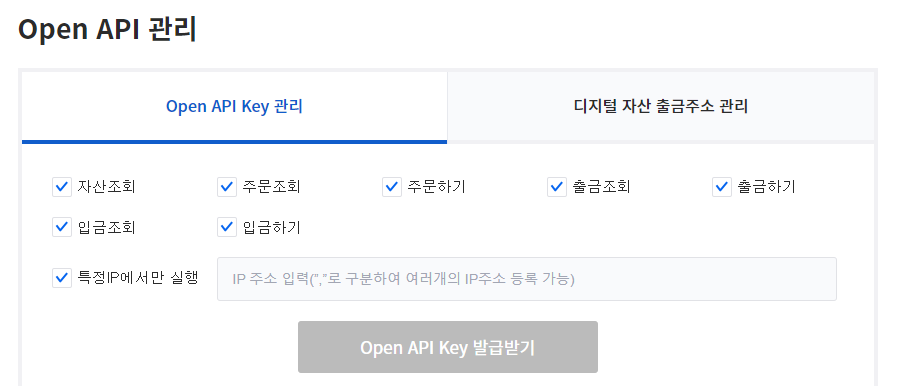
  1. Open web site "https://upbit.com/mypage/open_api_management"
  2. Check all permissions
  3. Input your ip address key
  4. Issuance of authentication key
  5. Input keys (see https://github.com/setreuid/upbit-sensor/blob/main/tools.go#L133) key2

Decide which stocks to trade

See https://github.com/setreuid/upbit-sensor/blob/main/main.go#L19
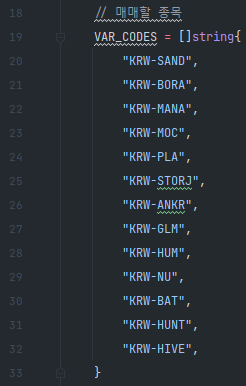
stocks

Modify trading options

See https://github.com/setreuid/upbit-sensor/blob/main/main.go#L35
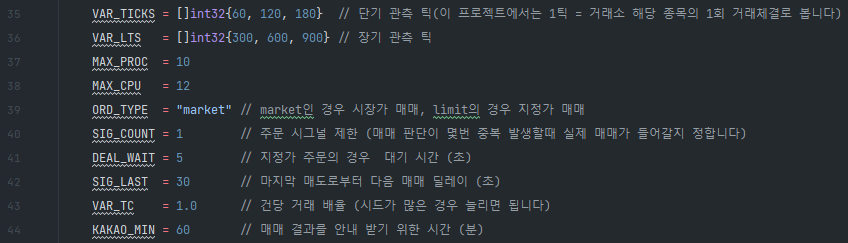
options

Modify trading strategy

See https://github.com/setreuid/upbit-sensor/blob/main/upbit.go#L230

trade

About

Upbit auto trading bot

Resources

Stars

Watchers

Forks

Releases

No releases published

Packages

No packages published

Languages