A high-performance bidirectional path tracing renderer written in C/C++ and CUDA, designed to run on NVIDIA GPUs. This project implements advanced rendering techniques including global illumination, caustics, and various material types (diffuse, specular, refractive).
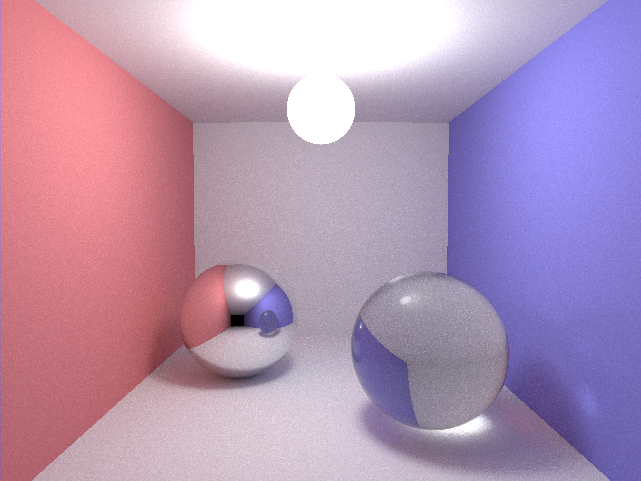
- GPU Accelerated: Leverages CUDA for parallel ray tracing on NVIDIA GPUs
- Bidirectional Path Tracing: Implements light path tracing from both camera and light sources
- Multiple Material Types:
- Diffuse surfaces
- Specular reflections (mirrors)
- Refractive materials (glass, water)
- Emissive light sources
- Real-time Visualization: Uses OpenGL/GLUT for interactive rendering
- Scene File Support: Load custom scenes from
.scnfiles - Cornell Box Scenes: Includes multiple pre-configured test scenes
gpu_bidirectional_raytracer/
├── src/                          # Source files
│   ├── device.cu                 # Main CUDA kernel implementations
│   ├── smallptCPU.c              # Host code and main entry point
│   ├── displayfunc.c             # OpenGL display and UI functions
│   └── MersenneTwister_kernel.cu # Random number generation
├── include/                      # Header files
│   ├── vec.h                     # Vector math operations
│   ├── geom.h                    # Geometry structures (Ray, Sphere)
│   ├── geomfunc.h                # Geometry utility functions
│   ├── camera.h                  # Camera structure
│   ├── scene.h                   # Scene definitions
│   ├── displayfunc.h             # Display function declarations
│   ├── simplernd.h               # Simple random number generator
│   ├── cons.h                    # Constants and configuration
│   └── MersenneTwister.h         # Mersenne Twister RNG header
├── assets/                       # Asset files
│   ├── scenes/                   # Scene definition files (.scn)
│   ├── images/                   # Sample rendered images
│   └── data/                     # Data files (RNG initialization)
├── tests/                        # Test files
├── Makefile                      # Build configuration
├── README.md                     # This file
└── LICENSE                       # License information
To build and run this project, you need:
- NVIDIA GPU: CUDA-capable GPU (compute capability 2.0 or higher recommended)
- CUDA Toolkit: Version 7.0 or later (Download)
- GCC/G++: Compatible with your CUDA version
- OpenGL Development Libraries:
libGL,libGLUlibglut(FreeGLUT)libGLEW
- cuRAND: CUDA Random Number Generation library (included with CUDA Toolkit)
sudo apt-get update
sudo apt-get install build-essential freeglut3-dev libglew-devsudo dnf install gcc-c++ freeglut-devel glew-devel-
Clone the repository:
git clone https://github.com/sim186/gpu_bidirectional_raytracer.git cd gpu_bidirectional_raytracer -
Build the project:
make
This will create the
smallptCPUexecutable. -
Clean build artifacts (if needed):
make clean
./smallptCPU [scene_file]If no scene file is specified, the default Cornell box scene is used.
./smallptCPU assets/scenes/cornell.scnOnce the renderer is running, you can interact with it using:
- Arrow Keys / WASD: Move the camera
- Mouse: Rotate the camera view
- R: Reset the camera to the initial position
- Space: Pause/Resume rendering
- S: Save current frame as PPM image
- H: Display help menu
- ESC / Q: Quit the application
Scene files (.scn) define the camera position and objects in the scene:
camera <orig_x> <orig_y> <orig_z> <target_x> <target_y> <target_z>
size <num_spheres>
sphere <radius> <pos_x> <pos_y> <pos_z> <emit_r> <emit_g> <emit_b> <color_r> <color_g> <color_b> <material>
Material Types:
0: Diffuse1: Specular (mirror)2: Refractive (glass)3: Light source
The assets/scenes/ directory contains various pre-configured scenes:
cornell.scn: Classic Cornell boxcornell_mirror.scn: Cornell box with mirror spherecornell_glass.scn: Cornell box with glass spherecaustic.scn: Scene demonstrating caustic effectssimple.scn: Simple test scene- And many more...
Key parameters can be adjusted in include/cons.h:
RAYNTHREAD: Number of threads per block (default: 64)RAYNGRID: Number of blocks in grid (default: 64)MAXITER: Maximum ray bounce depth (default: 6)TOL: Tolerance for ray termination (default: 0.0001)
Rendered images are saved in PPM format. To convert to more common formats:
# Convert PPM to PNG using ImageMagick
convert image.ppm image.png

# Or using GIMP
gimp image.ppm- Adjust Thread Configuration: Modify
RAYNTHREADandRAYNGRIDincons.hbased on your GPU - Reduce Max Iterations: Lower
MAXITERfor faster but less accurate renders - GPU Selection: If you have multiple GPUs, ensure CUDA uses the correct one
- Resolution: Start with lower resolutions for faster iteration
Contributions are welcome! Here's how you can help:
- Fork the repository
- Create a feature branch:
git checkout -b feature/your-feature-name - Make your changes: Follow the existing code style
- Test your changes: Ensure the project builds and runs
- Commit your changes:
git commit -am 'Add some feature' - Push to the branch:
git push origin feature/your-feature-name - Submit a pull request
- Use consistent indentation (tabs or spaces, as per existing code)
- Follow C/C++ naming conventions:
snake_casefor local variablesPascalCasefor functionsUPPER_CASEfor constants and macros
- Add comments for complex algorithms
- Keep functions focused and modular
- Requires NVIDIA GPU with CUDA support
- OpenGL compatibility issues on some systems
- Scene parsing is basic and may not handle all edge cases
Problem: nvcc: command not found
- Solution: Ensure CUDA is installed and
nvccis in your PATH
Problem: OpenGL headers not found
- Solution: Install OpenGL development libraries (see Prerequisites)
Problem: CUDA out of memory
- Solution: Reduce
RAYNTHREADandRAYNGRIDvalues, or use a smaller resolution
Problem: Blank screen or no rendering
- Solution: Check GPU compatibility, update NVIDIA drivers, verify scene file format
This project is licensed under the terms specified in the LICENSE file.
- Based on the smallpt path tracer concept
- Cornell Box scene from Cornell University Graphics Lab
- Mersenne Twister random number generator implementation
For questions or issues, please open an issue on GitHub.
Note: This is a research/educational project. Performance and features may vary based on hardware and configuration.