
Bringing A2UI to Google Workspace with Gemini
This repository demonstrates how to implement Google's A2UI (Agent-to-User Interface) protocol entirely within the Google Apps Script (GAS) ecosystem.
By porting the official concepts to GAS, this project enables developers to create dynamic, AI-generated interactive interfaces—such as booking forms, live editors, and metadata viewers—that run natively in Google Sheets Dialogs and Web Apps without complex external server infrastructure.
A2UI is a "secure-by-design" protocol that allows AI agents to generate rich user interfaces using a strict schema rather than arbitrary code. This project leverages the Gemini API to orchestrate these interfaces within Google Workspace, focusing on Task-Driven UIs where the interface adapts to the user's progress.
Key Features:
- Serverless Architecture: Runs entirely on Google Apps Script (GAS).
- Workspace Integration: Interacts directly with Google Sheets, Calendar, and Drive.
- Recursive UI Loop (Sample 4): A stateful workflow where Gemini evaluates previous interactions to generate the next appropriate UI (e.g., Select File -> OK -> Open Editor).
- Feedback-Loop Architecture (Sample 5): Uses Google Sheets as a persistent memory store to track user performance and adaptively adjust content difficulty.
- Gemini Routing: Uses LLM-based routing to select appropriate tools and generate A2UI JSON payloads.
The implementation follows a stateful, agent-driven lifecycle. The backend uses the conversation history to decide which functional UI to build next.
- User Input: The user interacts with an HTML interface.
- Request:
google.script.runsecurely bridges the client and the GAS backend. - Reasoning: Gemini acts as a router to decide which tool to execute and generates an initial UI (e.g., a File Selector).
- Recursive Interaction: When the user performs an action (like clicking "OK"), the client sends a System Event back to GAS.
- Stateful Generation: Gemini evaluates the original prompt + new selection from the history to generate the final functional interface (e.g., a dynamic Text Editor).
graph TD
    User((User)) <--> Client[HTML Interface / Sheet Dialog]
    Client <-- google.script.run --> Agent[GAS Server / Gemini API]
    Agent -- 1. Route Intent --> Router{Gemini Router}
    Router -- 2. Execute Tool --> Tools[Apps Script Functions]
    Tools <--> Data[(Sheets / Calendar / Drive)]
    Tools -- 3. Result --> Agent
    Agent -- 4. Generate A2UI JSON --> Client
    Client -- 5. Interaction Event + Selection --> Agent
    Agent -- 6. Re-generate UI based on History --> Client
Obtain a valid API key from Google AI Studio.
Select a sample below and copy the Google Spreadsheet to your Drive.
| Sample | Type | Description | Link |
|---|---|---|---|
| 1. Restaurant Finder | Web App | Official A2UI port. Search & Book restaurants. | Copy |
| 2. Budget Simulator | Web App | Charts & Sheet updates. | Copy |
| 3. Workspace Sync | Dialog | Integrated Sidebar/Dialog with Calendar sync. | Copy |
| 4. Drive Task Agent | Dialog | Recursive Loop! Dynamic file metadata/content editor. | Copy |
| 5. Adaptive Learning | Sidebar | Feedback Loop! Persistent memory & adaptive quizzes. | Copy |
- Open the copied Spreadsheet.
- Go to Extensions > Apps Script.
- Open
main.gs(orCode.gs) and set your API Key toconst apiKey = "###";. - Save the script.
- Reload the Spreadsheet.
- Click the custom menu "sample" > "run" (or "Start Learning").
- A dialog or sidebar will open. Enter your request.
This sample reproduces the official A2UI "Restaurant finder" agent as a standalone Web App.
- Action: Enter "Find 3 Chinese restaurants in New York".
- Interaction: The AI returns list cards. Clicking "Book Now" dynamically generates a reservation form.
| Initial View | Search Result | Reservation Form |
|---|---|---|
 |
 |
 |
A practical business automation sample that calculates a household budget and updates a Google Sheet.
- Action: Ask "Check this month's budget".
- Interaction: The AI reads data from the sheet, generates a pie chart (A2UI), and offers a simulation.
| Budget Visualization | Simulation Result | Data Updated |
|---|---|---|
 |
 |
 |
This sample demonstrates "Bringing A2UI to Google Workspace". It runs inside a modal dialog within Google Sheets and interacts with local data and Google Calendar.
Demonstration Video (YouTube):
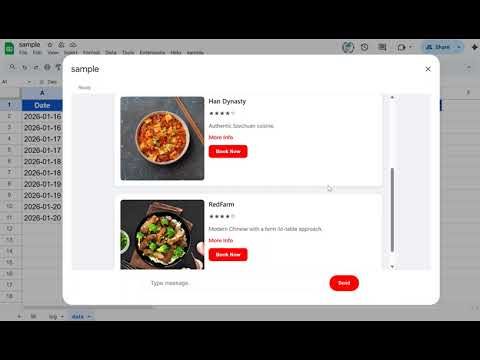
Supported Prompts:
- Restaurant Booking:
- "Find 3 Chinese restaurants in New York"
- The agent finds restaurants (mock data) and provides a booking form.
- Event Management:
- "Show me events for Jan 17-20"
- The agent searches the "data" sheet for events, displays them in a checkbox list, and allows you to add selected events to your Google Calendar.
Source Code: sample/A2UI-Google-Sheets
This sample demonstrates Recursive UI Generation. The agent builds the tool you need based on the conversation history and your interactions.
Demonstration Video (YouTube):
Supported Prompts:
Replace 'sample' with the actual folder name in your Google Drive.
- View Content: "List files in 'sample' and show their content."
- View Metadata: "Show me metadata for files in 'sample'."
- Verify and Edit: "I want to edit a file in 'sample'. Show me the files first."
Key Mechanics:
- The "OK" Button: Clicking OK sends a System Event with selected file IDs. Gemini analyzes the original intent to decide whether to render a Viewer, Metadata card, or an Editor.
- Dynamic Editor: Supports real-time text file updates (e.g., .txt, .json, .html).
Source Code: sample/Drive-Task-Agent
This sample demonstrates a Feedback-Loop Architecture utilizing Google Sheets as a persistent memory store. The agent generates personalized quizzes, tracks performance, and dynamically adjusts difficulty based on historical data.
Demonstration Video (YouTube):
Supported Prompts:
- Adaptive Learning: "Create a quiz about Google Apps Script basics."
- Generates targeted questions.
- Analyzes answers and logs results to Sheets.
- Provides a "Performance Analysis" dashboard with next steps.
- Versatility Verification: "Find 3 Chinese restaurants in New York"
- Demonstrates that the same architecture handles complex transactional flows (booking forms) alongside educational logic.
Key Mechanics:
- Goal Definition & Context Retrieval: Scans the active Spreadsheet for past performance data before generating content.
- Immediate Feedback: Validates answers in real-time and updates the "Memory" (Google Sheets).
- Strategic Analysis: Gemini provides qualitative feedback (Strengths/Weaknesses) rather than just scores.
- Recursive Logic: AI can manage multi-step workflows by generating specialized interfaces on the fly.
- Dynamic UI: A2UI enables AI agents to render interactive components (buttons, charts, forms, editors) based on context.
- GAS-Native: Leverages
google.script.runfor efficient, serverless client-server communication. - Workspace Synergy: Seamlessly bridges the gap between AI reasoning and Google Workspace data management.
- A2UI: An open project for agent-driven interfaces
- Official A2UI Repository
- Article: A2UI for Google Apps Script
- Article: Bringing A2UI to Google Workspace with Gemini
- Article: Beyond Chatbots: Building Task-Driven Agentic Interfaces in Google Workspace with A2UI and Gemini
-
v1.0.0 (January 8, 2026)
- Initial release.
-
v1.0.1 (January 19, 2026)
- Added a sample 3 "Workspace Sync".
-
v1.0.2 (February 3, 2026)
- Added a sample 4 "Drive Task Agent" with recursive UI generation logic.
-
v1.0.3 (February 7, 2026)
- Added a sample 5 "Adaptive Learning Agent" with feedback-loop architecture.