Chart your path through the labyrinth of #ifdef directives with the ultimate explorer tool!
Embark on a stellar journey with IFDEF Pathfinder, an extension so advanced it could run a starship. Never lose your way in the labyrinth of nested #ifdef statements again. Chart your course through conditional compilation with the finesse of a starship captain navigating the stars.
Say goodbye to the dark ages of manual #ifdef tracking. With IFDEF Pathfinder, you'll have a trusty co-pilot illuminating your path with vibrant colors, guiding you through the most complex #ifdef terrains. Whether you're a novice space cadet or a seasoned code explorer, this extension ensures your voyage through the cosmos of conditional logic is smoother than ever.
In a universe where coding can feel like navigating an asteroid field, IFDEF Pathfinder is your reliable star map, your trusty tricorder, your beacon in the vast expanse of preprocessor directives. Ready to join the ranks of elite code explorers? With IFDEF Pathfinder, you'll boldly go where no coder has gone before!
- Supports all
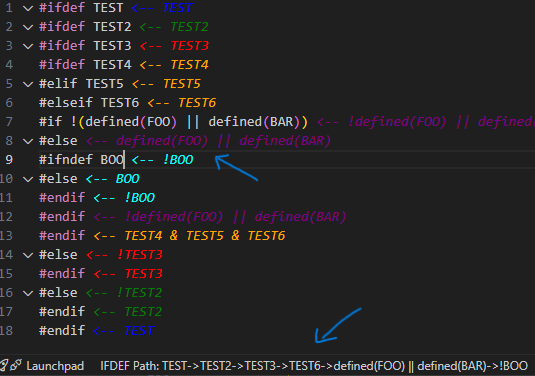
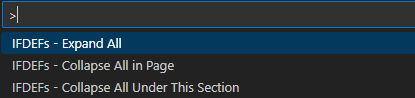
#ifdef,#if,#elif, and other preprocessor variants. - Region folding: Add new VSCode commands to collapse/expand
#ifdefsections (accessible via F1). - Colorized and highlighted
#ifdefsections with relevant logic indicators. - Dynamic path decoration for nested
#ifdefblocks displayed in the status bar.
- Open the Extensions view by clicking the Extensions icon in the Activity Bar on the side of the window or by pressing
Ctrl+Shift+X. - Search for
IFDEF Pathfinder. - Click the
Installbutton.
- Press
Ctrl+PorF1to access IFDEF folding options:IFDEFs - Collapse All in PageIFDEFs - Collapse All Under This SectionIFDEFs - Expand All
- The status bar will show the nested
#ifdefpath. - Enjoy the colorful and highlighted
#ifdefsections with clear logic indicators.
This extension does not require any special configuration. However, you can customize the colors used for decorations by modifying the extension settings.
See the CHANGELOG.md for details about the latest updates.
Contributions are welcome! Please submit issues or pull requests via GitHub.
This extension is licensed under the MIT License. See the LICENSE file for more information.