
Simple contact form via block or legacy shortcode with optional spam protection via Akismet and reCaptcha
Provide your users and visitors a simple and straight forward contact form.
The modern design is very clear, easy to navigate and with light-weight JS and CSS code. One big benefit is its flexible positioning in pages and posts as a modern style block or classic shortcode.
To keep your website safe, it comes with built in spam and bot protection, by using Akisment and reCaptcha for messages sent by visitors. The plugin is continuously improved and used on live websites since 2012.
th23 Contact is built with some few goals in mind:
- Simple and straight forward option for user to contact you
- Light-weight code basis without overheads and frameworks
- Easy to adapt styling to fit any page design and layout
- Fight spam and bots without unnecessary hurdles (admittedly it's a compromise)
See it in action on my Contact page.


For a manual installation upload extracted th23-contact folder to your wp-content/plugins directory.
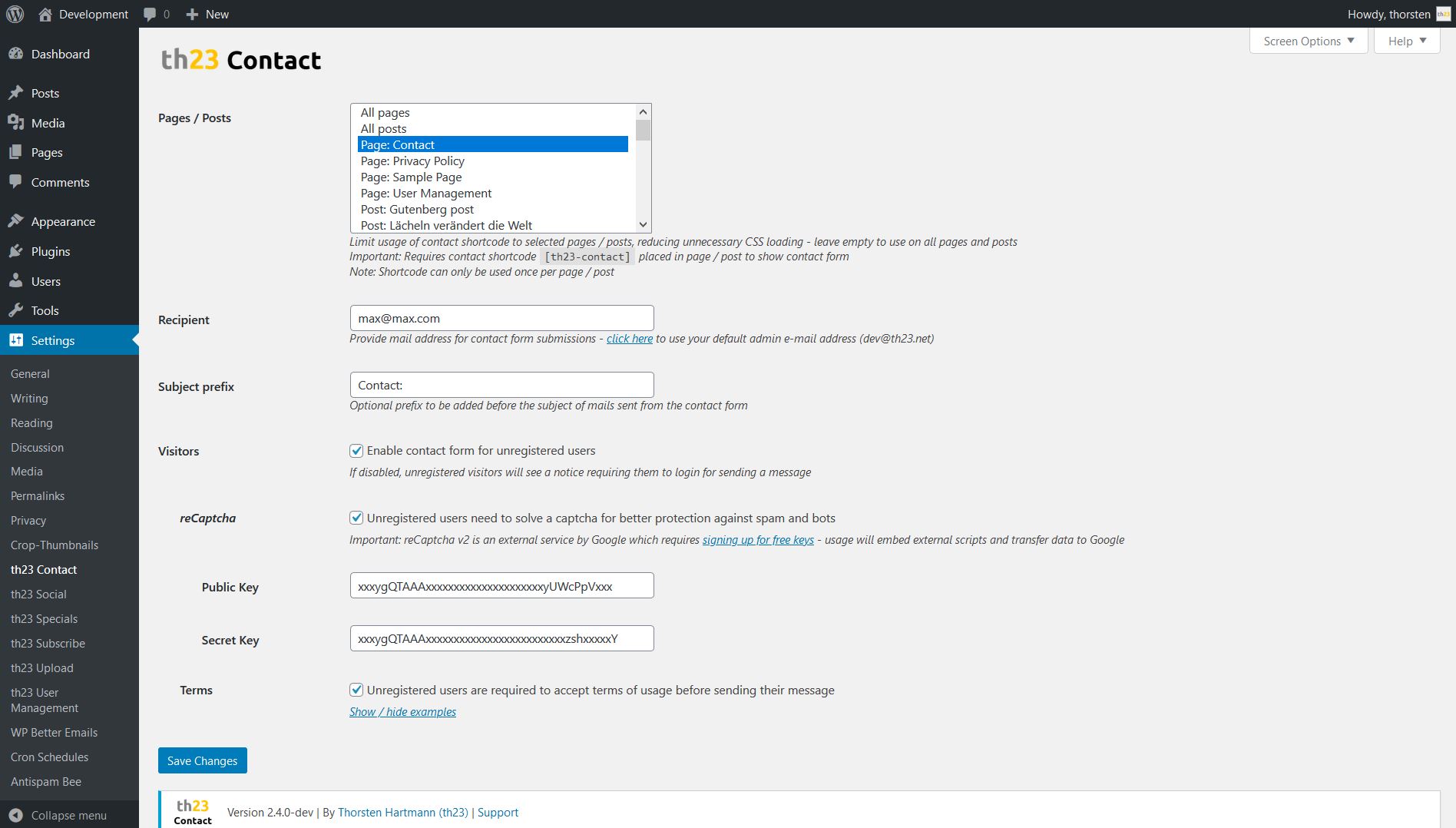
The plugin is configured via its settings page in the admin area. Find all options under Settings -> th23 Contact. The options come with a description of the setting and its behavior directly next to the respective settings field.
Simply insert a new th23 Contact form block into the post / page using the plus sign in the Gutenberg editor or start typing /th23 Contact form.
Alternatively use the [th23-contact] shortcode directly in the source code editor view of a post / page or insert it as a legacy shortcode block.
Note
The th23 Contact form block and / or shortcode can only be used once per post / page!
Any second instance in the same post / page will be ignored upon frontend rendering and not show up.
Tip
Ensure th23 contact form is enabled for the sepcific post / page - see admin area under Settings -> th23 Contact.
A: reCaptcha is around for a long time and available in various versions. Its version 2 was added to this plugin some years ago. Unfortunately with latest advances in computing, it has to be considered "broken" by now.
Since version 3.1.0 of this plugin, there is (additionally) the option to use Akismet to detect spam. It uses a much broader approach and thus for now seems to show significatly better detection of spam. Activate it on the plugins settings page.
A: You can enable the block / shortcode for selected pages / posts only to save your users unnecessarily loading JavaScript and CSS files.
But for convenience the th23 Contact block / [th23-contact] shortcode can also be enabled for All pages, All posts or an selected set of pages / posts. Simply visit the plugin settings in your admin area. Under "Pages / Posts" you have the free choice.
To select multiple items on a PC simply keep the "Ctrl" key pressed any click on the pages / posts you want to select.
Feel free to raise issues or contribute code for improvements via GitHub.
You are free to use this code in your projects as per the GNU General Public License v3.0. References to this repository are of course very welcome in return for my work 😉