Disclaimer:
- It is NOT a smoke-detector. There has to be a flame (preferably erupting) in the image, for the model to classify it as "Fire".
- The focus is on the end-to-end aspects of the ML problem, rather than a pure model performance boosting exercise/competition. Put differently, a decently performing model a few steps closer to being put in production, is being preferred here over a very high performance model which never ventured out of its home of Jupyter notebook. (I love Jupyterlab, BTW.)
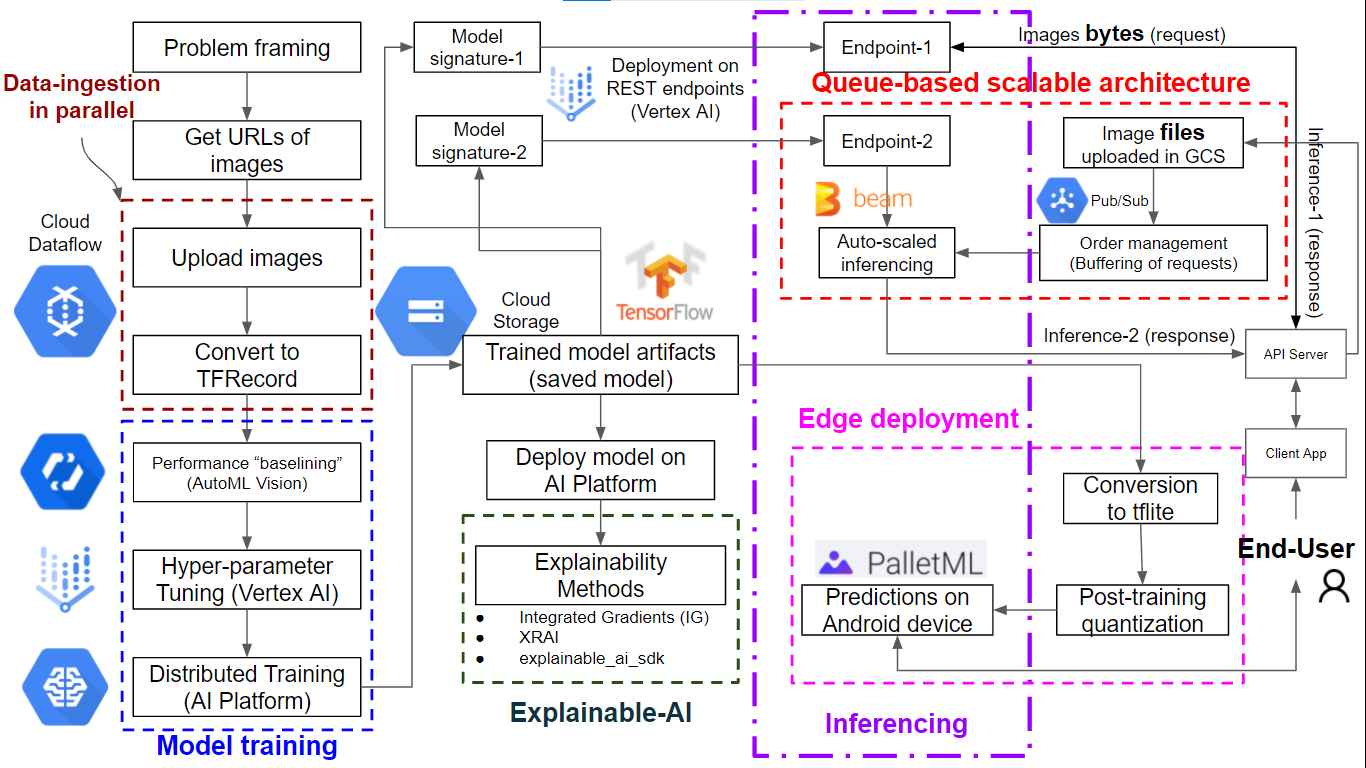
Step 1: Problem framing
Type of ML problem: Image Classification
No. of classes: Two (Binary classification)
No. of labels per image: One/Single
Performance-metric chosen: Accuracy
Reasons:
- Though the class distribution in dataset is not perfectly balanced, it's not heavily skewed either.
- False Negatives (e.g. actual fire cases which went undetected) are as much to avoid, as False Positives (e.g. false alarms). Having said that, if you were to put a gun on my head and force me to pick either of the two, I'll prefer Recall over Precision, for this use-case.
Step 2: Curate-Data
Get images' urls from Google search e.g. using keywords like 'building on fire', 'bushfires', 'vehicles burning' etc.
Step 3: Parallelized Data-Ingestion
Load images to GCS through Cloud DataFlow pipeline
Convert image files in GCS, to TFRecords format, using Cloud Dataflow pipeline. [Note: This step took almost 14 vCPU hours on GCP, in my case.]
Why to convert to TFRecord format?:
- to reduce time spent on reading data while model is being trained
- ability to embed image metadata e.g. label (or bounding box coordinates in case of object detection)
Why to do pre-processing (JPEG decoding, scaling etc.) BEFORE converting to TFRecord?: to avoid redoing these steps while iterating on training data.
Why didn't we do image re-sizing also as a part of pre-processing at this stage itself?: Coz different models (if any) might need different resizing options. Since we choose to retain that flexibility, resizing will happen at training stage.
Another option worth considering here: Store the JPEG bytes (compressed in a manner tailored for images), rather than pixel values, in TFRecord format.
Step 4: Setting baseline for model performance metrics
Train a AutoML model using Python SDK for Vertex AI. [Caution: This step cost me ~ $30.]
Step 5: Hyper-parameter-Tuning
Submitting hptuning job for our custom NN model, on Vertex AI [Note: Make sure there are enough GPU quotas for the GCP Project-ID.]
Step 6: Model-Training
Distributed training (for the chosen hyper-parameter combo) across multiple GPUs [Note: Access to > 1 GPU is needed for MirroredStrategy in this step. For <= 1 GPU, just get rid of the strategy part of the code.]
Why have we used data-parallelism, instead of model-parallelism?: Coz model-parallelism is better suited for sparse and massive files/datapoints while an image is dense and small.
Step 7: Explainable-AI
Add explainability (instance-level feature importances) to the model predictions by
- using Integrated-Gradients (pixel-based) and Explainable Representations through AI (XRAI; region-based) techniques on AI-Platform [Note: Choose your runtime-version carefully.]
- using Explainable-AI-SDK
Choosing an appropriate baseline is critical here since the explanation (of model predictions) is relative to the baseline. So it is worth trying a few different baselines.
Step 8: Inferencing
8A) Setting model signature(s) to infer from:
- image files
- image bytes
In both cases, we deploy the model by creating an endpoint on Vertex-AI.
Why do we need the bytes option at this stage?: What if we don't have the luxury of first uploading images to GCS, before sending them to our trained/exported model? In such cases, we can keep files locally stored, just send the extracted bytes over to the model in the form of json request, and get a json response in return.
8B) Use of messaging based architecture:
- Cloud Pub/Sub for buffering and load-balancing
- Apache Beam for 1. auto-scaling and 2. a codebase flexible for handling batch as well as streaming data
Caution: Once you are done, make sure to clean-up the artifacts in the Cloud, in order to avoid a rather prohibitive bill on month-end:
- Delete subscription from the Pub/Sub topic
- Delete Pub/Sub topic
The above two steps are implemented in the codebase. The following/remaining 3 steps I carried out through the GCP console/UI:
- Un-deploy the endpoint of the model deployed on Vertex-AI
- Remove the endpoint (extremely important step)
- Delete model deployed (though it hardly incurs any cost, as long as endpoints have been deleted/removed)
Step 9: Edge-deployment
Deployment on Android smartphone
- convert TF2.x model to tflite version
- post-training quantization/optimization
- deploy on Android device using PalletML
Image classification: One image at a time
fire_detector.mp4
Real time activity classification on smartphone camera feed: Whether or not there is fire in the footage
https://www.youtube.com/watch?v=kRwpTxY51W8&list=PLu-ygFb6gcEZevplnFiQBR4Vuhot8YSuN&index=2
Credits:
- Practical Machine Learning for Computer Vision, by Valliappa Lakshmanan, Martin Görner, and Ryan Gillard. Copyright 2021 Valliappa Lakshmanan, Martin Görner, and Ryan Gillard, 978-1-098-10236-4
- Maven Wave (my employer) for giving me ample opportunities to not just learn new concepts, but also to get my hands dirty in cloud sandboxes
- course by quicktensorflow