Turn Playwright trace.zip into flows, APIs, and tests you can trust.






playwright-specgen is a trace → flow → test compiler for UI behaviour. Record once with Playwright. Get readable flows, API maps, and executable tests - automatically.
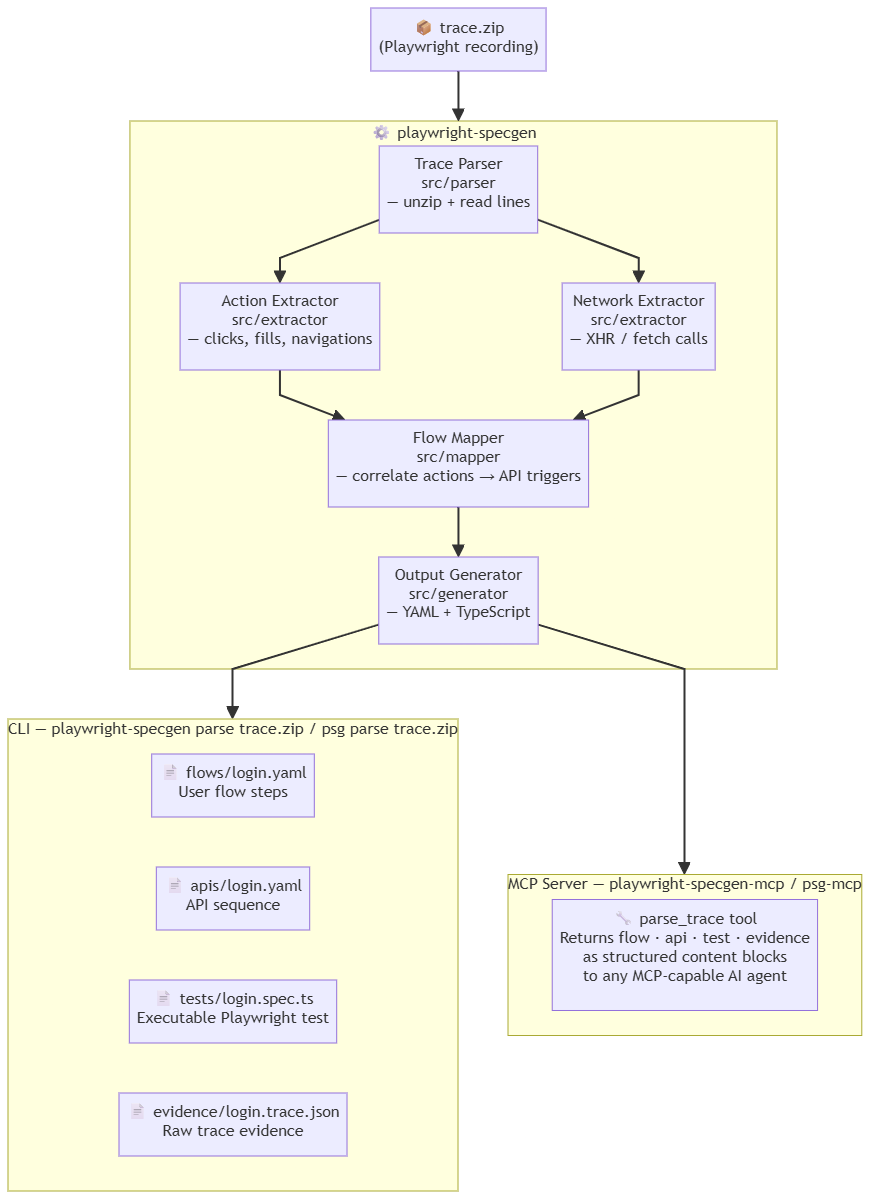
- What is playwright-specgen?
- UI modernisation
- playwright-specgen in the age of AI Agents
- Quick start
- Real-world example: microsoft/TypeScript PR review
- Installation
- CLI usage
- Output reference
- Pipeline integration
- What this is (and isn't)
- How playwright-specgen compares
- Known limitations
- Development
- License
- Support the project
Teams working on legacy or evolving web apps often:
- don't fully understand existing UI behaviour
- lack reliable test coverage
- miss hidden API dependencies
- introduce regressions during rewrites or modernisation
playwright-specgen solves this by reading the Playwright trace you already have and compiling it into artefacts you can commit, review, and replay.
Playwright trace.zip → user flows + API maps + Playwright tests
No custom recorder. No AI guessing. Just your trace, turned into something reusable.
If your team is rewriting, upgrading, or migrating a web application, playwright-specgen gives you something most modernisation projects lack: a concrete, verifiable record of what the old UI actually did.
Record existing flows → get behavioral specs → modernise → replay tests → confirm nothing broke
Specifically:
- Before you touch anything - record Playwright traces of the critical user journeys in the current app. Run playwright-specgen. Commit the
flows/andapis/directories. These become your baseline. - Understand hidden API dependencies - the
apis/output surfaces every backend call the UI makes, including undocumented endpoints that only appear during specific interactions. You will not find these by reading frontend code alone. - After modernisation - run your Playwright tests against the new UI. If the flows diff cleanly against the baseline, behaviour is preserved. If steps or API triggers change, you know exactly where.
- Hand-off to AI agents - feed the flow YAML and evidence JSON to your coding agent as the definition of correct behaviour. See playwright-specgen in the age of AI Agents.
This works even if you have zero existing test coverage. The trace is the test.
The core problem with AI-assisted development is not generation - it's grounding.
AI coding agents (Cursor, GitHub Copilot, Claude) write code confidently but without knowing what your application actually does. A 100k-line legacy codebase is opaque to an LLM. A 50-line flow YAML is not.
playwright-specgen creates machine-readable behavioural specifications derived from real usage - the missing layer between recorded human behaviour and AI agent operation.
Instead of pasting 3,000 lines of source code, give your AI agent the flow:
Here is the current checkout flow recorded from production:

[flows/checkout.yaml]

Implement the "save for later" feature without changing any of these
steps or their API triggers.
The flow YAML is precise, concise, and factual - it describes what the app does, not how it's built.
When AI rewrites a component, you no longer have to trust it manually. Record a new trace and compare:
# Before AI rewrites the checkout page
playwright-specgen parse traces/checkout-before.zip --stdout > baseline.json

# After AI rewrites it
playwright-specgen parse traces/checkout-after.zip --stdout > current.json

# Diff the flow YAML
diff <(jq -r .flowYaml baseline.json) <(jq -r .flowYaml current.json)
If the diff is clean, the AI preserved behaviour. If API triggers changed or steps disappeared, you caught a regression before it shipped.
Understanding what a legacy app does is the hardest problem in modernisation. You can't easily explain it with code alone. playwright-specgen lets you explain it with recorded, factual behaviour:
# Extract all flows from recorded sessions
for f in traces/*.zip; do playwright-specgen parse "$f" --stdout; done

# Feed the evidence to your LLM
cat evidence/*.trace.json | llm "What are the critical user paths in this application?
Which API endpoints are called most frequently? What could break if we
replace the authentication service?"
The evidence.json files are timestamped, structured, and derived mechanically from real traces - not inferred by an LLM. This is the factual ground truth that prevents hallucination when asking AI to reason about app behaviour.
AI browser automation agents (Playwright MCP, browser-use, Claude computer-use) need to know: what pages exist, what forms to fill, what buttons trigger what actions. playwright-specgen surfaces all of this from one recording.
A flow YAML can be converted directly into agent instructions:
# playwright-specgen output → AI agent prompt context
flow: create-ticket
steps:
  - action: navigate
    url: /projects/webapp/issues/new
  - action: fill
    selector: "#issue_title"
  - action: click
    selector: "#label-selector"
    triggers:
      - method: GET
        path: /projects/webapp/labels
        status: 200
  - action: click
    selector: "[data-submit]"
    triggers:
      - method: POST
        path: /projects/webapp/issues
        status: 201
An agent reading this knows exactly what path to follow, what inputs exist, and what API response to expect - without having to explore the UI from scratch.
Define the expected flow first. Have AI implement to spec. Verify by replaying the generated test:
Design principle: write the flow spec before writing the feature.
Record the desired UX as a Playwright trace.
Run playwright-specgen to generate the acceptance test.
Give both the flow YAML and the .spec.ts to your AI agent as the definition of done.
This inverts the usual AI development loop - instead of hoping AI guesses the right behaviour, you specify the behaviour and AI fills in the implementation.
playwright-specgen ships with a built-in MCP (Model Context Protocol) server that exposes flows, API sequences, and evidence as tools any MCP-capable AI agent can call directly - without leaving the conversation.
Same npm package, two modes:
| Mode | Command | Use case |
|---|---|---|
| CLI | playwright-specgen parse trace.zip |
Terminal, CI, scripts |
| MCP server | playwright-specgen-mcp |
Claude Desktop, Cursor, any MCP client |
Configure in Claude Desktop (claude_desktop_config.json):
{
  "mcpServers": {
    "playwright-specgen": {
      "command": "playwright-specgen-mcp"
    }
  }
}
Available tool: parse_trace
| Parameter | Type | Required | Description |
|---|---|---|---|
trace_path |
string | ✅ | Path to the trace.zip file |
outputs |
array | - | Which outputs to return: "flow", "api", "test", "evidence". Defaults to all four. |
write_files |
boolean | - | If true, also write flows/, apis/, tests/, evidence/ to disk (same as CLI). Defaults to false. |
Each requested output is returned as a separate content block, so the agent can reason about just the parts it needs without processing a single large dump.
| Before AI agents | In the age of AI agents |
|---|---|
| Flows lived in engineers' heads | Flows need to be machine-readable |
| Tests proved code worked | Flows prove behaviour persists |
| Documentation was optional | Behavioural specs are AI context |
| Legacy code was the source of truth | Recorded traces are the source of truth |
playwright-specgen is not an AI tool. It is the observation layer that makes your application legible to AI tools.
Option A - try it now with the included sample (no Playwright setup needed):
# 1. Install
npm install -g playwright-specgen

# 2. Clone the repo to get the sample trace
git clone https://github.com/trycatchkamal/playwright-specgen.git
cd playwright-specgen

# 3. Run playwright-specgen on the real GitHub PR review trace
playwright-specgen parse samples/github-pr-review.zip

# 4. Inspect outputs - these are the exact files playwright-specgen generated
cat flows/github-pr-review.yaml
cat tests/github-pr-review.spec.ts
The samples/github-pr-review.zip file is a real Playwright trace recorded from the microsoft/TypeScript repository: issues list → click issue → PRs list → click PR → Files Changed tab. The expected outputs are shown in Real-world example below.
Option B - record your own trace:
# 1. Install
npm install -g playwright-specgen

# 2. Record a trace with Playwright
npx playwright codegen --save-trace trace.zip https://your-app.com

# 3. Run playwright-specgen
playwright-specgen parse trace.zip

# 4. Inspect outputs
cat flows/trace.yaml
cat tests/trace.spec.tsExact playwright-specgen output from running playwright-specgen parse samples/github-pr-review.zip - the trace file included in this repo. Flow: browse issues → open a pull request → view files changed on the public microsoft/TypeScript repository.
To record your own version of this trace:
npx playwright codegen --save-trace github-pr-review.zip https://github.com/microsoft/TypeScript/issuesflow: github-pr-review
intent: User performs github pr review
component_type: navigation
steps:
- action: navigate
url: https://github.com/microsoft/TypeScript/issues
role: precondition
- action: click
selector: a[data-hovercard-type="issue"] >> nth=0
role: precondition
triggers:
- method: GET
path: /_graphql
status: 200
- method: GET
path: /microsoft/TypeScript/pulls
status: 200
- method: POST
path: /pull_request_review_decisions
status: 200
- action: navigate
url: https://github.com/microsoft/TypeScript/pulls
role: precondition
- action: click
selector: a[data-hovercard-type="pull_request"] >> nth=0
role: precondition
triggers:
- method: GET
path: /microsoft/TypeScript/pull/63248/hovercard
status: 200
- method: GET
path: /microsoft/TypeScript/pull/63248
status: 200
- method: GET
path: /microsoft/TypeScript/pull/63248/partials/links
status: 200
- method: POST
path: /commits/badges
status: 200
- method: POST
path: /microsoft/TypeScript/commits/checks-statuses-rollups
status: 200
- method: GET
path: /microsoft/TypeScript/pull/63248/page_data/diffstat
status: 200
- method: GET
path: /microsoft/TypeScript/pull/63248/page_data/tab_counts
status: 200
- method: GET
path: /microsoft/TypeScript/pull/63248/partials/processing_indicator
status: 200
- method: GET
path: /microsoft/TypeScript/pull/63248/partials/processing_indicator
status: 200
- method: GET
path: /microsoft/TypeScript/issues/preheat
status: 200
- method: GET
path: /microsoft/TypeScript/pull/63248/files
status: 200
- action: click
selector: "[data-tab-item=\"files-tab\"], a[href*=\"/files\"] >> nth=0"
role: goal_action
triggers:
- method: GET
path: /microsoft/TypeScript/pull/63248/partials/processing_indicator
status: 200
- method: GET
path: /microsoft/TypeScript/pull/63248/partials/processing_indicator
status: 200
- method: GET
path: /microsoft/TypeScript/issues/preheat
status: 200
- method: GET
path: /microsoft/TypeScript/pull/63248/files
status: 200
outcome: success
- action: navigate
url: https://github.com/microsoft/TypeScript/pull/63248/files
role: preconditionWhat this reveals immediately, without reading any source code:
- Clicking an issue triggers
/_graphqlcalls - hovercards and lazy-loaded UI are powered by GraphQL, not REST - Opening a PR fires 11 parallel API calls: hovercard, page content, partial links, CI badge status, checks rollups, diff stats, tab counts, processing indicators, issues preheat, and files - all before you've interacted with the page
POST /pull_request_review_decisionsfires automatically on the PRs list - GitHub pre-fetches your review status for every visible PR before you open any of them- The Files Changed tab triggers
POST /diffs/<sha>..<sha>- diffs are computed server-side, identified by full commit SHA pairs GET /issues/preheatfires in the background during navigation - GitHub pre-warms issue data speculatively
api_sequence:
  - method: GET
    path: /microsoft/TypeScript/issues
    status: 200
  - method: GET
    path: /_filter/issue_fields
    status: 200
  - method: GET
    path: /_graphql
    status: 200
  - method: GET
    path: /_graphql
    status: 200
  - method: GET
    path: /_graphql
    status: 200
  - method: GET
    path: /microsoft/TypeScript/pulls
    status: 200
  - method: POST
    path: /pull_request_review_decisions
    status: 200
  - method: GET
    path: /microsoft/TypeScript/pull/63248/hovercard
    status: 200
  - method: GET
    path: /microsoft/TypeScript/pull/63248
    status: 200
  - method: GET
    path: /microsoft/TypeScript/pull/63248/partials/links
    status: 200
  - method: POST
    path: /commits/badges
    status: 200
  - method: POST
    path: /microsoft/TypeScript/commits/checks-statuses-rollups
    status: 200
  - method: GET
    path: /microsoft/TypeScript/pull/63248/page_data/diffstat
    status: 200
  - method: GET
    path: /microsoft/TypeScript/pull/63248/page_data/tab_counts
    status: 200
  - method: GET
    path: /microsoft/TypeScript/pull/63248/partials/processing_indicator
    status: 200
  - method: GET
    path: /microsoft/TypeScript/pull/63248/partials/processing_indicator
    status: 200
  - method: GET
    path: /microsoft/TypeScript/issues/preheat
    status: 200
  - method: GET
    path: /microsoft/TypeScript/pull/63248/files
    status: 200
  - method: GET
    path: /microsoft/TypeScript/pull/63248/partials/processing_indicator
    status: 200
  - method: POST
    path: /microsoft/TypeScript/diffs/77ddb5b443ae3479b91bcaff0920d9f1ef0d31bc..43da8b5d452fa23d6a4dda27dfc9157988dbc7b8
status: 200import { test, expect } from '@playwright/test';
test('github-pr-review flow', async ({ page }) => {
await page.goto('https://github.com/microsoft/TypeScript/issues');
await page.click('a[data-hovercard-type="issue"] >> nth=0');
await page.click('a[data-hovercard-type="pull_request"] >> nth=0');
await page.click('[data-tab-item="files-tab"], a[href*="/files"] >> nth=0');
await expect(page).toHaveURL('/microsoft/TypeScript/pull/63248/files');
});Note on mid-flow navigation: The current generator only emits
page.goto()for navigations that occur before the first user interaction. Mid-flow navigations are captured in the flow YAML but not yet emitted asgotocalls in the test.
npm install -g playwright-specgenpnpm add -g playwright-specgenOnce installed, both the CLI and MCP server are available globally:
# CLI
playwright-specgen parse trace.zip
psg parse trace.zip

# MCP server (for Claude Desktop, Cursor, etc.)
playwright-specgen-mcp
psg-mcp# Clone the repo
git clone https://github.com/trycatchkamal/playwright-specgen.git
cd playwright-specgen
# Install dependencies
pnpm install
# Build
pnpm build
# (Optional) link globally so `playwright-specgen` is available everywhere
pnpm link --globalThe CLI entry point is
dist/index.js(playwright-specgen/psg) and the MCP server entry point isdist/mcp.js(playwright-specgen-mcp/psg-mcp), both registered inpackage.json#bin.
playwright-specgen parse <path-to-trace.zip>Writes four output directories relative to the current working directory:
| Directory | File | Contents |
|---|---|---|
flows/ |
<name>.yaml |
Ordered user flow steps with API triggers |
apis/ |
<name>.yaml |
Flat API call sequence |
tests/ |
<name>.spec.ts |
Executable Playwright test |
evidence/ |
<name>.trace.json |
Raw parsed trace data |
The output filename is derived from the input zip name - login.zip → login.yaml / login.spec.ts.
playwright-specgen parse trace.zip --stdoutPrints a GeneratedOutput JSON object to stdout. Useful for piping into other tools or capturing in CI scripts.
{
  "flowYaml": "...",
  "apiYaml": "...",
  "testTs": "...",
  "evidenceJson": "..."
}playwright-specgen --help
playwright-specgen parse --helpEach step maps an action to any API calls it triggered within a 2 000 ms window. The generator enriches every step with: intent and component_type for the whole flow; role (precondition | goal_action) per step; field_hint derived from the selector for fill steps; outcome on the goal action; and sensitive values are automatically scrubbed to {{REDACTED}}.
flow: login
intent: User performs login
component_type: form
steps:
  - action: navigate
    url: "https://example.com/login"
    role: precondition
  - action: fill
    selector: "#email"
    field_hint: email
    value: test@example.com
    role: precondition
  - action: fill
    selector: "#password"
    field_hint: password
    value: "{{REDACTED}}"
    role: precondition
  - action: click
    selector: "#login-button"
    role: goal_action
    triggers:
      - method: POST
        path: /auth/login
        status: 200
      - method: GET
        path: /user/profile
        status: 200
outcome: successA structured, ordered list of all API calls in the trace. Static assets and 4xx/5xx responses are filtered out. Each entry is an object with method, path, and status - consistent with the trigger objects in the flow YAML and directly parseable by scripts and AI tools.
api_sequence:
  - method: POST
    path: /auth/login
    status: 200
  - method: GET
    path: /user/profile
    status: 200
  - method: GET
    path: /dashboard/summary
status: 200A ready-to-run Playwright test. Password/token/secret fields are replaced with environment variable references. The toHaveURL assertion uses the pathname of the last navigation detected in the trace.
import { test, expect } from '@playwright/test';

test('login flow', async ({ page }) => {
  await page.goto('https://example.com/login');
  await page.fill('#email', 'test@example.com');
  await page.fill('#password', process.env.PASSWORD ?? '');
  await page.click('#login-button');
  await expect(page).toHaveURL('/dashboard');
});Raw parsed data keyed under source, actions, and network - ready for debugging or feeding to an LLM as factual app context.
{
  "source": "login.zip",
  "actions": [
    { "type": "navigate", "url": "https://example.com/login", "timestamp": 1000 },
    { "type": "fill", "selector": "#email", "value": "test@example.com", "timestamp": 1200 },
    { "type": "click", "selector": "#login-button", "timestamp": 1600 }
  ],
  "network": [
    { "method": "POST", "path": "/auth/login", "status": 200, "timestamp": 1850 },
    { "method": "GET", "path": "/user/profile", "status": 200, "timestamp": 1920 }
  ]
}playwright-specgen reads the standard Playwright trace.zip format. Enable tracing in your Playwright config:
// playwright.config.ts
export default defineConfig({
  use: {
    trace: 'on',                // always record
    // trace: 'on-first-retry', // record on failure only
  },
});
Or record ad hoc with the Playwright inspector:
npx playwright codegen --save-trace trace.zip https://example.comTraces land in test-results/<test-name>/trace.zip by default.
# Single trace
playwright-specgen parse test-results/login-test/trace.zip

# Multiple traces (bash loop)
for f in test-results/**/*.zip; do
  playwright-specgen parse "$f"
done
Commit flows/ and apis/ to your repo - they become living documentation, and flow regressions become visible in PR diffs.
# .github/workflows/playwright-specgen.yml
name: Generate playwright-specgen outputs

on:
  push:
    branches: [main]
  pull_request:

jobs:
  playwright-specgen:
    runs-on: ubuntu-latest

    steps:
      - uses: actions/checkout@v4

      - uses: actions/setup-node@v4
        with:
          node-version: '20'

      - name: Install playwright-specgen
        run: npm install -g playwright-specgen

      - name: Install Playwright browsers
        run: npx playwright install --with-deps chromium

      - name: Run Playwright tests with tracing
        run: npx playwright test --trace on
        continue-on-error: true   # collect traces even on test failure

      - name: Generate playwright-specgen outputs
        run: |
          for f in test-results/**/*.zip; do
            playwright-specgen parse "$f"
          done

      - name: Upload playwright-specgen artefacts
        uses: actions/upload-artifact@v4
        with:
          name: playwright-specgen-outputs
          path: |
            flows/
            apis/
            tests/
evidence/| playwright-specgen IS | playwright-specgen is NOT |
|---|---|
| A trace interpreter | A UI modelling system |
| A test generator | An AI UI generator |
| An API discovery tool | A full modernisation engine |
| A behaviour documentation tool | A visual diff tool |
| playwright-specgen | Playwright Codegen | HAR export | Cypress Studio | |
|---|---|---|---|---|
| Input | Existing trace.zip |
Live browser session | Browser DevTools | Live browser session |
| Works without re-recording | ✅ | ❌ | ❌ | ❌ |
| Flow YAML with step roles | ✅ | ❌ | ❌ | ❌ |
| API call mapped per action | ✅ | ❌ | Flat list only | ❌ |
| Playwright test generated | ✅ | ✅ | ❌ | ❌ (Cypress only) |
| Sensitive value scrubbing | ✅ | ❌ | ❌ | ❌ |
| Structured evidence JSON | ✅ | ❌ | ❌ | ❌ |
CI --stdout mode |
✅ | ❌ | ❌ | ❌ |
| Works on legacy apps with no existing tests | ✅ | ✅ | ✅ | ✅ |
Key difference: Playwright Codegen and Cypress Studio require an interactive recording session and produce only a test file. HAR export gives you raw network data but no action correlation and no test. playwright-specgen is the only tool that takes an existing trace and produces correlated flows, API maps, tests, and evidence in one pass - without touching the browser again.
| Limitation | Detail |
|---|---|
| Selectors may break after a UI rewrite | playwright-specgen preserves selectors exactly as recorded. It does not abstract or stabilise them semantically. |
| Dynamic selectors break immediately | Auto-generated class names (CSS Modules, Tailwind JIT, styled-components), hash-suffixed IDs, and framework-generated data-* attributes change on every build. Selectors containing these will fail even if the UI is visually identical. Prefer recording flows on apps that use stable, semantic selectors (#id, [data-testid], [aria-label]). |
| SPA edge cases | Client-side navigation via the History API or hash routing does not always produce a navigate event in the trace. Flows through single-page apps may appear shorter than expected or skip intermediate routes entirely. Mid-flow navigations must be verified manually in the generated test. |
Network noise in api_sequence |
Analytics pings, A/B test beacons, telemetry calls, and third-party CDN requests on the same host appear alongside first-party API calls in apis/<name>.yaml. There is no built-in filter by path prefix or call purpose. Filter the output with grep or jq if you need only your own API. |
| Cross-origin calls silently dropped | The parser infers the primary hostname from the first navigation in the trace and silently drops all network calls to other hostnames. If your app calls APIs on a subdomain or a separate API domain (e.g. api.yourapp.com while navigating app.yourapp.com), those calls will not appear in api_sequence or trigger mappings. |
| No semantic understanding of UI | Steps are derived from raw trace events, not inferred intent. |
| Only captured flows | Behaviour not present in the recorded trace will not appear in output. |
| No advanced diffing | playwright-specgen does not compare flows across multiple traces. |
| Mid-flow navigation not emitted in tests | The generator only emits page.goto() for navigations that occur before the first user interaction. If a flow involves navigating to a new page mid-session (e.g. login → navigate to dashboard → interact), the mid-flow goto must be added manually to the generated test. |
| Sites with iframes | playwright-specgen cannot reliably generate flows or tests for interactions inside <iframe> elements (e.g. embedded payment widgets, embedded login forms, third-party chat widgets). The Playwright trace records iframe actions with the same event type as main-frame actions but without frame hierarchy context, so generated selectors will be scoped incorrectly and the resulting .spec.ts will fail at runtime. Sites where the primary flow happens entirely in the main frame are unaffected. CAPTCHA iframes are naturally excluded since Playwright does not interact with them during recording. |
# Run all tests
pnpm test

# Run tests in watch mode
pnpm test:watch

# Run tests with coverage
pnpm test:coverage

# Type-check without emitting
pnpm lint

# Build to dist/
pnpm build

# Clean build artefacts
pnpm cleansrc/
parser/ - unzip + read trace.trace / trace.network lines
extractor/ - extract typed actions and network calls from JSON-lines
mapper/ - correlate clicks to API calls within 2 000 ms window
generator/ - emit YAML and .spec.ts strings
cli/ - commander CLI (parse command + --stdout flag)
types/ - shared TypeScript interfaces
index.ts - CLI entry point
mcp.ts - MCP server entry point (playwright-specgen-mcp / psg-mcp)
tests/
fixtures/ - in-memory zip builder for unit tests
*.test.ts - vitest test suites (120 tests)
MIT © playwright-specgen Contributors
Permission is hereby granted, free of charge, to any person obtaining a copy of this software and associated documentation files (the "Software"), to deal in the Software without restriction, including without limitation the rights to use, copy, modify, merge, publish, distribute, sublicense, and/or sell copies of the Software, and to permit persons to whom the Software is furnished to do so, subject to the following conditions:
The above copyright notice and this permission notice shall be included in all copies or substantial portions of the Software.
THE SOFTWARE IS PROVIDED "AS IS", WITHOUT WARRANTY OF ANY KIND, EXPRESS OR IMPLIED, INCLUDING BUT NOT LIMITED TO THE WARRANTIES OF MERCHANTABILITY, FITNESS FOR A PARTICULAR PURPOSE AND NONINFRINGEMENT. IN NO EVENT SHALL THE AUTHORS OR COPYRIGHT HOLDERS BE LIABLE FOR ANY CLAIM, DAMAGES OR OTHER LIABILITY, WHETHER IN AN ACTION OF CONTRACT, TORT OR OTHERWISE, ARISING FROM, OUT OF OR IN CONNECTION WITH THE SOFTWARE OR THE USE OR OTHER DEALINGS IN THE SOFTWARE.
If playwright-specgen saves you time, a star helps others find it and signals the project is worth maintaining.
Made with care for teams who inherit codebases they didn't write.