Inspect React Native traffic across simulator, emulator, and real devices.




Dashboard on :19826. Optional proxy on :8899. Direct capture from fetch and XMLHttpRequest.
|
|
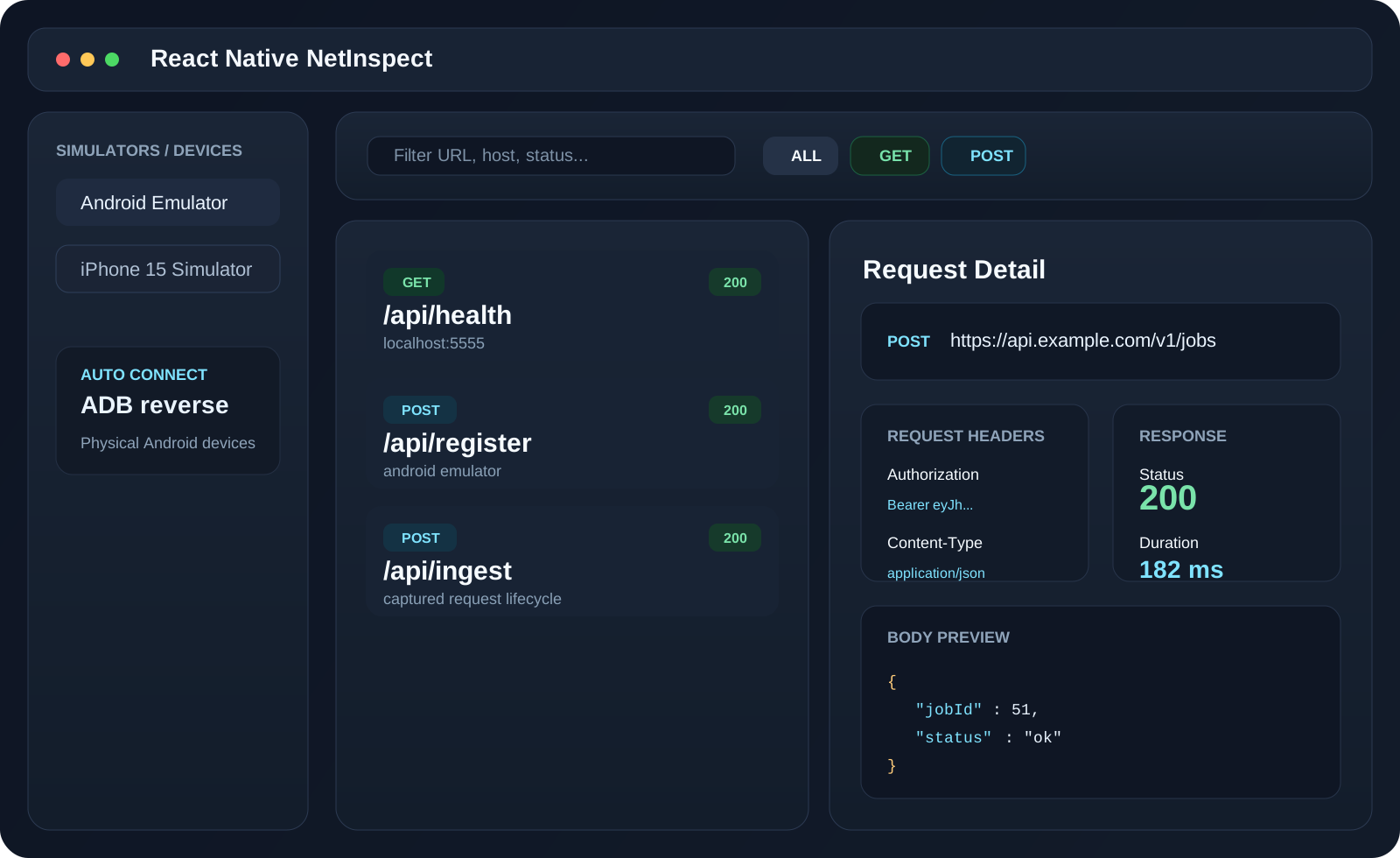
- See request method, URL, headers, body, status, duration, and response payload in one place.
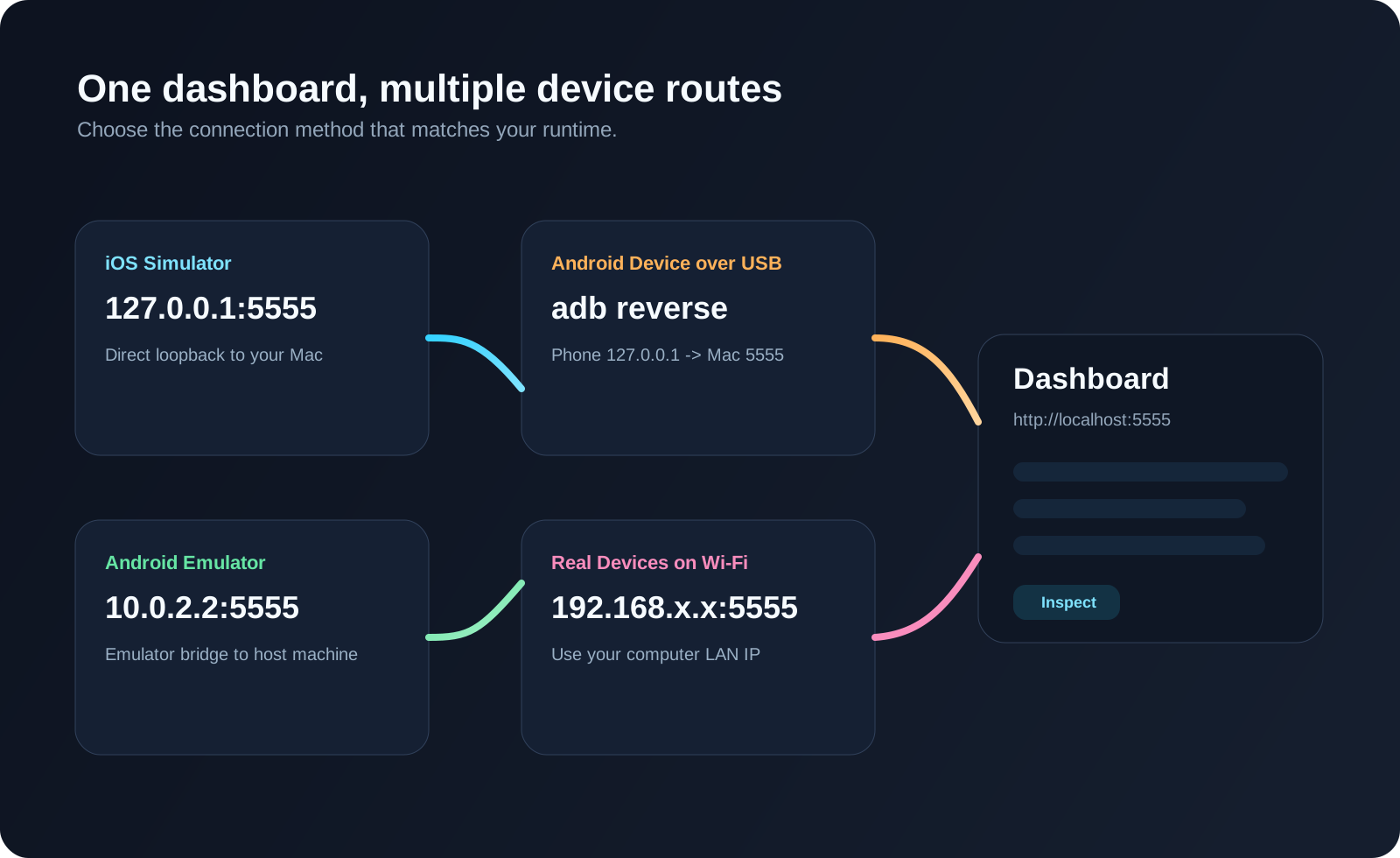
- Works across iOS Simulator, Android Emulator, USB-connected Android devices, and Wi-Fi-connected real devices.
- Supports direct client capture, Android emulator proxy flow, and Android real-device
adb reverseflow. - Keeps setup local: run one server on your machine and inspect requests from your app immediately.
npm install -D @twinedo/rn-netinspectThis is the simplest setup for both iOS Simulator and Android Emulator.
Use this in development mode:
if (__DEV__) {
  void import("@twinedo/rn-netinspect").then(({ installRNNetInspect }) => {
    installRNNetInspect({
      appName: "My RN App",
      // inspectorUrl: "http://10.0.2.2:19826", // Android emulator reaches the host machine through 10.0.2.2.
    });
  });
}
Why this setup:
- works in stricter ESLint setups without disabling rules
- keeps the library development-only
- usually works for both Simulator and Emulator without extra setup
- if Android Emulator does not connect automatically, uncomment
inspectorUrl
npx rn-netinspect-serverhttp://localhost:19826- iOS:
npm run ios - Android:
npm run android
Then trigger requests in the app and watch them appear in the dashboard.
Most developers should start with the quick start above first.
If the Android Emulator does not connect, uncomment this line:
inspectorUrl: "http://10.0.2.2:19826", // Android emulator reaches the host machine through 10.0.2.2.10.0.2.2 is how the Android Emulator reaches your computer.
Real devices may need a manual inspectorUrl.
- iPhone over Wi-Fi:
http://<your-computer-lan-ip>:19826 - Android over Wi-Fi:
http://<your-computer-lan-ip>:19826 - Android over USB: use
adb reverse tcp:19826 tcp:19826
If you want the server to auto-manage adb reverse for physical Android devices, run:
npx rn-netinspect-server --auto-connectAndroid proxy mode changes global device network settings. This can affect the whole emulator or phone, not just your app.
Use proxy mode only when you really need it.
To clear old Android proxy settings:
adb shell settings put global http_proxy :0
adb shell settings put global https_proxy :0
adb shell settings delete global http_proxy
adb shell settings delete global https_proxy
adb shell settings delete global global_http_proxy_host
adb shell settings delete global global_http_proxy_port
adb shell settings delete global global_http_proxy_exclusion_list
If the dashboard opens but no requests appear:
- start the server before launching or reloading the app
- reload the app after the server is already running
- on Android Emulator, uncomment
inspectorUrl: "http://10.0.2.2:19826" - on real devices, make sure the device can reach your computer
installRNNetInspect({
  inspectorUrl: "http://127.0.0.1:19826",
  appName: "My RN App",
  captureBodies: true,
  patchFetch: true,
  patchXHR: true,
});The client sends events to:
POST /api/ingestThe dashboard also uses:
GET  /api/health
POST /api/register- make sure the app points to the correct
inspectorUrl - reload the app after the server is already running
- on physical devices, verify the phone can open the same URL in its browser
That is proxy configuration, not the direct client.
- On an emulator, prefer the direct client URL
http://10.0.2.2:19826 - On a real device, prefer
adb reverseor a LAN IP - Clear any old Android global proxy settings if necessary
Clear Android proxy settings:
adb shell settings put global http_proxy :0
adb shell settings put global https_proxy :0
adb shell settings delete global http_proxy
adb shell settings delete global https_proxy
Then check the phone Wi-Fi settings and ensure proxy is disabled.
React Native NetInspect logs use a colored [RN NetInspect] prefix.
To disable colors:
- set
NO_COLOR=1, or - set
global.__RN_INSPECTOR_NO_COLOR__ = truebefore callinginstallRNNetInspect()