Zego Express Example FaceUnity Demo (Android/iOS)
Please ensure that the development environment meets the following technical requirements:
Android
- Android Studio 2.1 or higher
- Android SDK Packages: Android SDK 25, Android SDK Build-Tools 25.0.2, Android SDK Platform-Tools 25..
- An Android Device (or emulator) running on Android 4.0.3 or higher version with a camera and microphone (a real device is recommended).
- The Android device and your computer are connected to the Internet.
iOS
- Xcode 6.0 or higher
- iOS devices or simulators with iOS version no less than 8.0 and audio and video support (the real machine is recommended).
- iOS device already connected to Internet
The SDK libZegoExpressEngine.so and ZegoExpressEngine.jar required to run the Demo project is missing from this Repository, and needs to be downloaded and placed in the Libs folder of the Demo project.
https://storage.zego.im/express/video/android/zego-express-video-android.zip
finally, the structure under the android/app/libs directory should be as follows:
.
├── README.md
├── README_zh.md
├── ios
└── android
    └── app
        └── libs
            ├── ZegoExpressEngine.jar
            ├── arm64-v8a
            │   └── libZegoExpressEngine.so
            ├── armeabi-v7a
            │   └── libZegoExpressEngine.so
            └── x86
                └── libZegoExpressEngine.so
The SDK ZegoExpressEngine.xcframework required to run the Demo project is missing from this Repository, and needs to be downloaded and placed in the Libs folder of the Demo project
You can use
Terminalto run theDownloadSDK.shscript in./iosdirectory, it will automatically download the latest SDK and move it to the corresponding directory.
Or, manually download the SDK from the URL below, unzip it and put the ZegoExpressEngine.xcframework under Libs
https://storage.zego.im/express/video/apple/zego-express-video-apple.zip
.
├── README.md
├── README_zh.md
├── android
└── ios
    ├── Libs
    │   ├── FaceUnity
    │   └── ZegoExpressEngine.xcframework
    ├── ZegoExpressExample-FaceUnity-iOS
    └── ZegoExpressExample-FaceUnity-iOS.xcodeproj
To build and run this sample app, you will need a ZEGO AppID and a corresponding AppSign for the app to access the ZEGO server. Please refer to the ZEGO Admin Console User Manual | _blank for the detailed instructions on how to obtain this information.
The authpack in the project is bound to BundleID, you need to contact FaceUnity to obtain authpack and replace.
-
Modify the source file
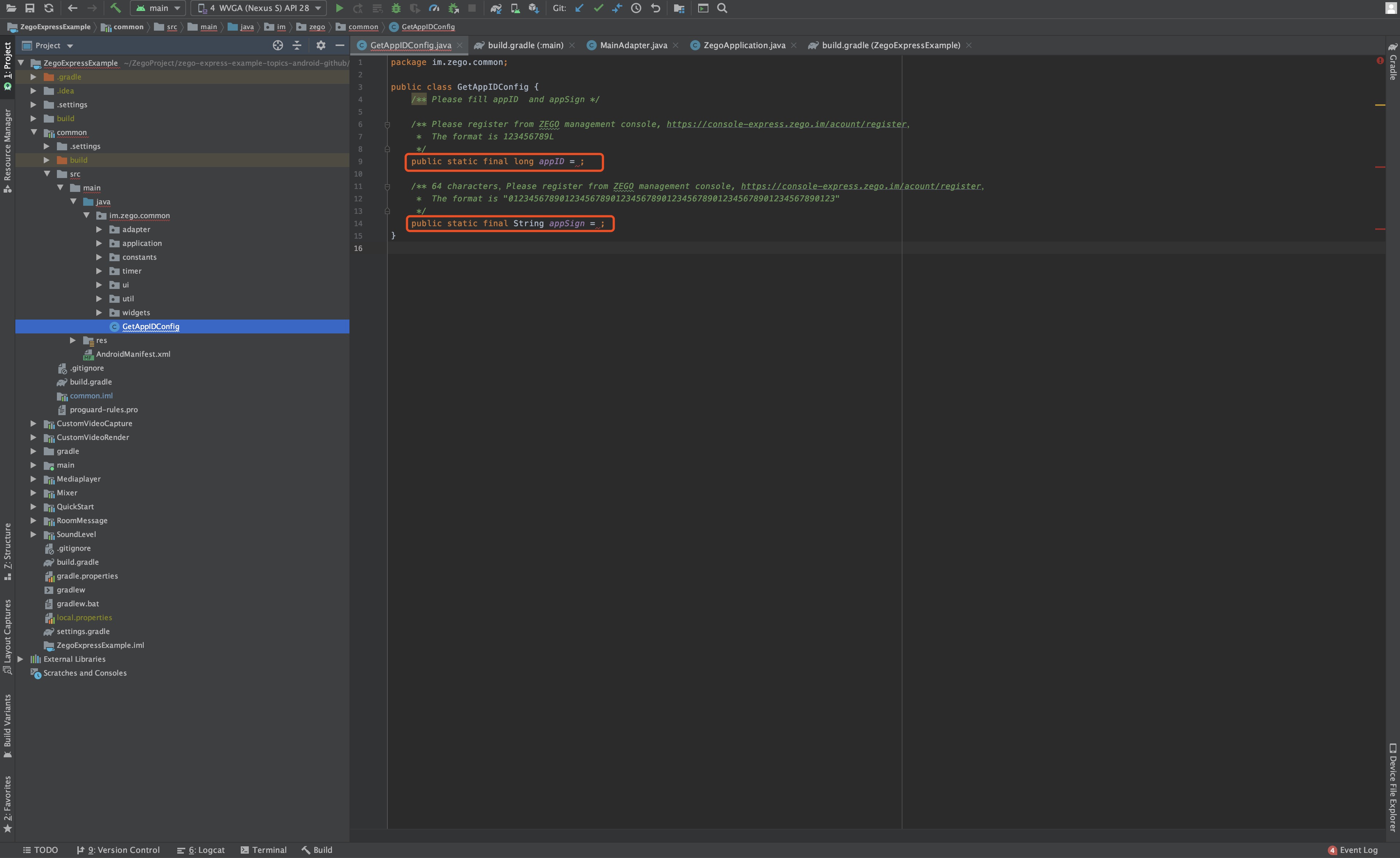
GetAppIdConfig.javain the directoryandroid/app/src/main/java/im/zego/expressample/faceu/demo/to assign values to the variablesappIDandappSign.Please note that you need to append a letter L to the AppID value you get from the ZEGO Admin Console when assigning the value to the variable
appIDin the program. -
Replace your
authpack.javaobtained from FaceUnity to the pathandroid/app/src/main/java/im/zego/expressample/faceu/demo/faceunity/authpack.java.
-
Modify the source file
ZGKeyCenter.munder the directoryios/ZegoExpressExample-FaceUnity-iOS/Helper/to fill in the correct AppID and AppSign. -
Replace your
authpack.hobtained from FaceUnity to the pathios/Libs/FaceUnity/authpack.h.
