Vision: “One APIs Access Any DataBase”
A database access library that provides unified access to different types of databases for Java, aiming to use a single API to access all databases.
Website • Documentation • Blog





dbVisitor is a unified data access foundation built on the JDBC standard, dedicated to realizing the vision of “One APIs Access Any DataBase”. With its unique Dual-Layer Adapter Architecture, it successfully breaks the programming barrier between RDBMS and NoSQL, allowing developers to seamlessly manipulate various databases such as MySQL, MongoDB, and Elasticsearch using the same set of standard APIs. dbVisitor does not advocate inventing new syntax to conceal differences, but rather scientifically manages differences through standardization and layered abstraction, providing a general-purpose data foundation for Java applications that is both convenient and retains the flexibility of JDBC.
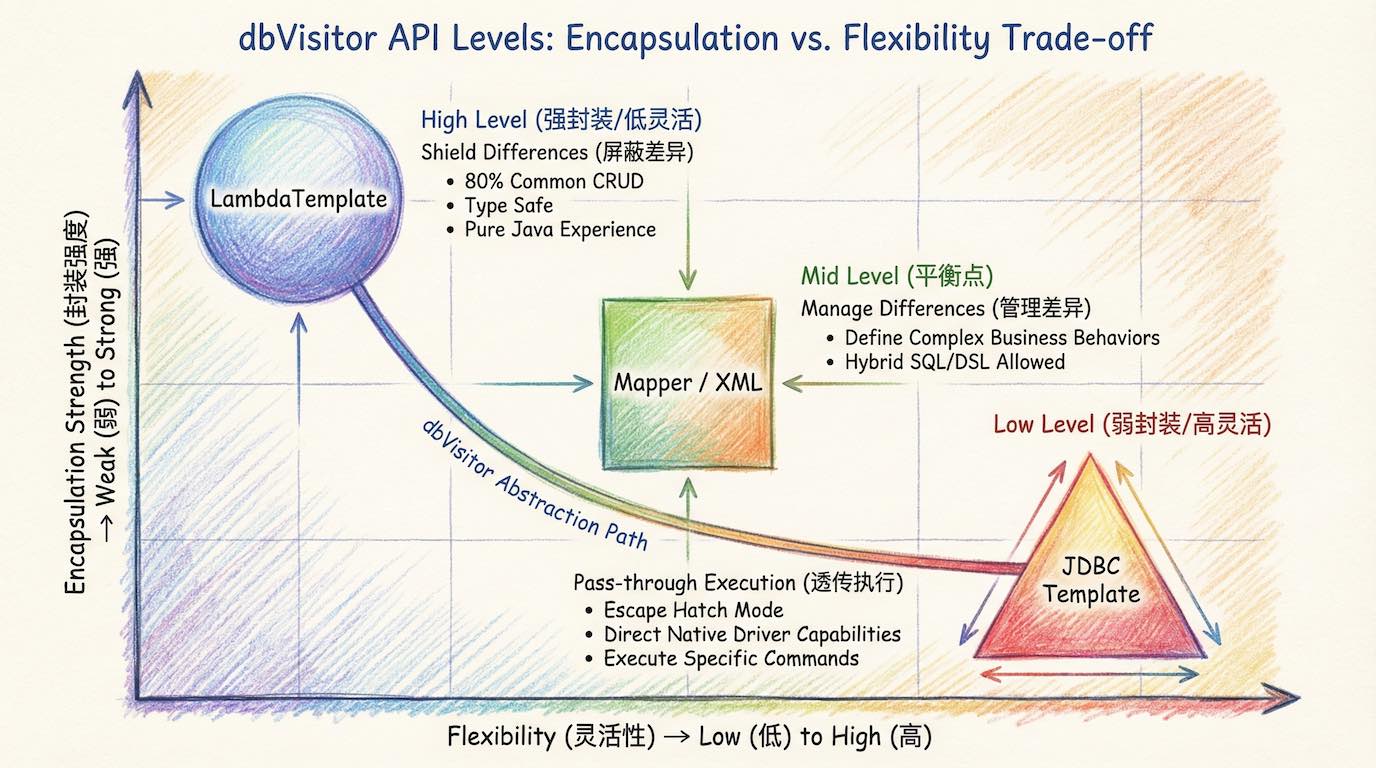
dbVisitor provides multi-level API abstraction, allowing for free switching between Simplicity and Flexibility:
- 🛡 LambdaTemplate: Shield Differences
- Type-safe Lambda query builder supporting method chaining.
- Single-table CRUD methods, ready to use out of the box, automatically translated into SQL or DSL for the target database.
- 🧱 Mapper/Interface: Manage Differences
- Declarative interface programming, supporting
@Query/XML, separating SQL/DSL logic from code. - Provides BaseMapper generic methods, eliminating legitimate repetitive development.
- Declarative interface programming, supporting
- 🔧 JdbcTemplate: Pass-Through Differences
- Standard JDBC template methods, supporting pass-through of native SQL and Shell scripts.
- Provides ConnectionCallback, allowing direct access to underlying driver APIs.
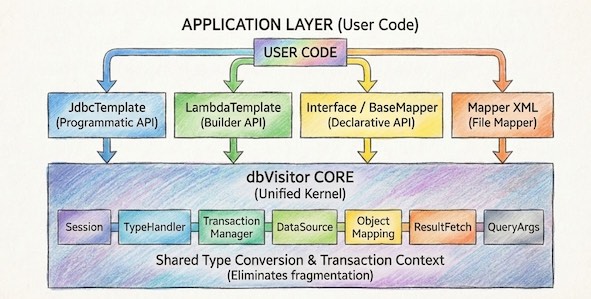
- 🛡️ Unified Base: One API conquers both RDBMS (MySQL, PG...) and NoSQL (Mongo, ES...).
- 🔌 Wide Compatibility: Pure Java (JDK8+), zero dependencies, perfectly adapted to mainstream frameworks like Spring/Solon.
- 📦 Lightweight: Minimalist design, core capability depends only on the
cobbletoolkit.
- API Layered Abstraction:
- Programmatic API: Access database programmatically, characterized by powerful flexibility.
- Declarative API: Centralize SQL maintenance through interfaces, making the code structure clearer.
- Generic Mapper: Generic Mapper makes your program more refined at the data access layer.
- Builder API: Construct query conditions via chain calls, avoiding the tediousness of handwritten SQL.
- File Mapper: Write SQL or DSL via files, completely separating SQL logic from code.
- JDBC Adapter: Provides standard encapsulation of JDBC, supporting access to various non-relational databases.
- Object Mapping:
- One API handles different types of data sources with a smooth learning curve and no need to master complex concepts.
- Supports intelligent result set mapping, automatically handling Camel Case Conversion and property filling.
- Built-in 6 types of Key Generators; custom ones are also supported.
- Tips: Relationship mapping is not supported (e.g., One-to-One, One-to-Many, Many-to-One, Many-to-Many).
- SQL Rules:
- Dynamic SQL Simplification: Introduces
@{...}rule syntax significantly simplifying dynamic SQL concatenation logic, saying goodbye to cumbersome XML tags. - SQL Enhancement Rules: Built-in rules like
@{and},@{or},@{in}, automatically determining whether conditions take effect based on parameter null values. - Argument Processing Rules: Supports directives like
@{md5},@{uuid}, preprocessing arguments before SQL execution.
- Dynamic SQL Simplification: Introduces
- Argument Processing:
- Supports Positional Arguments: Use "?" in statements to mark parameters, binding values to the corresponding index (starting from 0).
- Supports Named Arguments: Use syntaxes like :name, &name, or #{...} in statements to name parameters in SQL.
- Supports SQL Injection: Use ${...} syntax to retrieve values of named parameters and inject the result into the SQL statement.
- Supports Rule Arguments: Use @{...} syntax to leverage the Rule mechanism to gracefully handle common dynamic SQL scenarios.
- Supports Interface Mode: Customize parameter setting via interface implementation to meet special scenarios.
- TypeHandler:
- Receive Results:
- Provides multiple ways to process query results on all types of data sources.
- Common result processing includes Bean Mapping, RowMapper, RowCallbackHandler, ResultSetExtractor.
- Session/Transaction:
- Supports multi-datasource transaction management (non-distributed transactions).
- Supports transaction control capabilities identical to Spring, including 7 Transaction Propagation Behaviors.
- Control transactions via Programmatic, Annotation, and Template Method approaches.
- Tips: Although dbVisitor unifies transaction call forms, it cannot change the physical characteristics of the underlying database.
- Advanced Features:
- Strong affinity for Map structures, supporting multiple result set formats:
- Single value/Single column/Single row/Multi-row/Pagination receive modes.
- Supports returning List<Map>, Map<K,V>, Set<V>, primitive arrays, and other data structures.
- Unified pagination interface, automatically adapting to dialects like Limit/ROWNUM/Skip.
- Strong affinity for Map structures, supporting multiple result set formats:
- Driver Adapter:
- Can transform into an independent JDBC Driver, allowing MyBatis/Hibernate to also operate on NoSQL.
- Supports connecting to various databases via standard JDBC URLs.
- Adapted and supports Redis, MongoDB, ElasticSearch, etc.
- Dual-Layer Adapter Capability
- Use dbVisitor as both a database access library and a JDBC Driver. You can use its JDBC Driver independently, putting it into a Spring Boot + MyBatis project, instantly giving MyBatis the ability to operate on MongoDB and Elasticsearch.
- Unified Underlying Architecture
- Unlike simple patching, the various API levels in dbVisitor's Layered Abstraction share the same underlying mechanisms, avoiding the "Frankenstein" effect of multiple frameworks.
- Independence
- Not bound to any ecosystem framework like Spring or any Web container. Built on pure Java (JDK 8+) and JDBC standards. Seamlessly integrates whether it's Spring, SpringBoot, Solon, Hasor, Guice, or a Main method console program.
<dependency>
    <groupId>net.hasor</groupId>
    <artifactId>dbvisitor</artifactId>
    <version>6.4.0</version> <!-- Check Maven Central for the latest version -->
</dependency>Code is exactly the same whether operating on MySQL or Elasticsearch:
// Insert Data
template.insert(UserInfo.class)
        .applyEntity(new UserInfo("1001", "dbVisitor"))
        .executeSumResult();

// Query Data (Automatically translated to SQL or DSL)
List<UserInfo> list = template.lambdaQuery(UserInfo.class)
        .eq(UserInfo::getAge, 18)
.list();Define an interface to enjoy a MyBatis-like development experience:
@SimpleMapper
public interface UserMapper extends BaseMapper<UserInfo> {

    // Method 1: Pure Java Construction (No XML needed)
    default List<UserInfo> findActiveUsers(int minAge) {
        return this.query()
                   .eq(UserInfo::getStatus, "ENABLE")
                   .gt(UserInfo::getAge, minAge)
                   .list();
    }

    // Method 2: Annotation Binding (SQL / DSL)
    @Query("select * from user_info where age > #{age}")
    List<UserInfo> findByAge(@Param("age") int age);

    // Method 3: XML Mapping (Supports native SQL or DSL)
    // Coexists with UserMapper.xml, logic separation
    List<Map<String, Object>> groupByAge(@Param("minAge") int minAge);
}<!-- UserMapper.xml -->
<mapper namespace="com.example.UserMapper">
<select id="groupByAge">
<!-- Write native SQL (MySQL) -->
SELECT age, count(*) FROM user_info
WHERE age > #{minAge} GROUP BY age
<!-- Or write JSON DSL (Elasticsearch) -->
<!--
POST /user_info/_search
{
"query": { "range": { "age": { "gt": #{minAge} } } },
"aggs": { "age_group": { "terms": { "field": "age" } } }
}
-->
</select>
</mapper>When all abstractions fail to meet your needs, you can pierce through the framework:
JdbcTemplate template = ...;
// 1. Native SQL/Shell Pass-Through (Directly execute commands recognized by the database)
// MySQL
template.queryForList("select * from user where id = ?", 1);
// MongoDB (Directly write Mongo Shell)
template.queryForList("db.user.find({_id: ?})", 1);

// 2. Direct Core SDK Access (Unwrap Mechanism)
T resultList = jdbcTemplate.execute((ConnectionCallback<T>) con -> {
    // Unwrap the underlying native driver object (e.g., MongoClient) via standard JDBC Connection
    if (conn.isWrapperFor(MongoClient.class)) {
        MongoClient client = conn.unwrap(MongoClient.class);
        // Call any API of the official Driver...
    }
    return ...;
});- Website: https://www.dbvisitor.net
- Documentation: https://www.dbvisitor.net/docs/guides
- Blog: https://www.dbvisitor.net/blog
dbVisitor is released under the commercially friendly Apache 2.0 license.