Releases: Sou6900/suger-devtool
v1.0.18 : Api | Console Upgrade | Experiments Tool : React Dev | Console , Styles Rules , Other Fix

✨ What's New in v1.0.18 (beta-1)
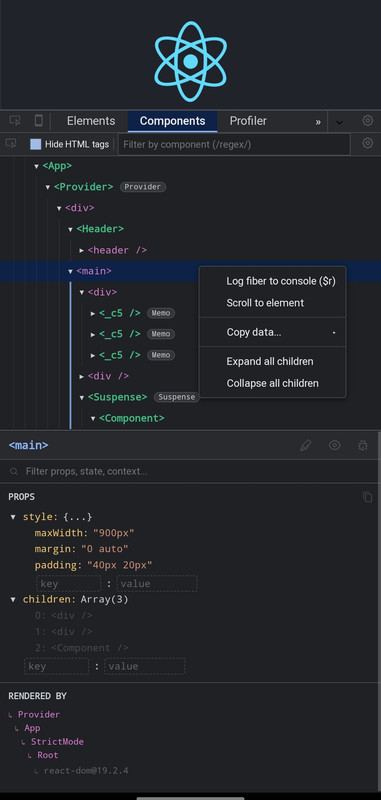
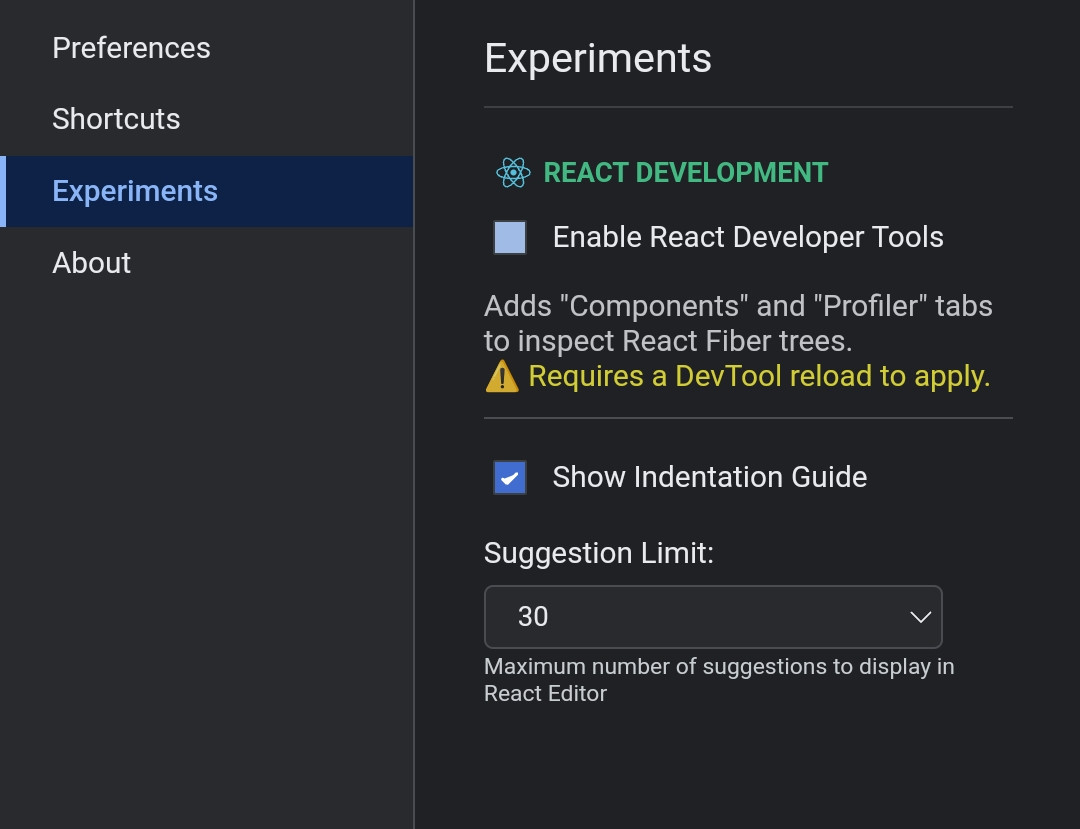
⚛️ React DevTools (Experimental)
- Native Fiber Inspection: Added native React Fiber inspection with Components & Profiler tabs.
- Live-Editing: Live-edit React Props, State, Context, and Hooks directly from the side panel.
- Performance Profiling: Advanced Render Profiler with Flamegraphs & Ranked view.
- Smart UI: VS Code-style indentation guides, dynamic badges (Memo, Provider, Suspense), and an advanced Context Menu (
$r,$tmp, Copy JSON). - Note: Enable this feature via the new Experiments tab in settings.
🛠️ Developer API Exposed
- Global
sugerobject added. You can now usesuger.show(),suger.hide(),suger.inspect(el)&suger.clear()programmatically from your code.
🎨 Styles & Elements Fixes
- Priority Fix: Massive improvements on CSS rule Specificity logic.
- Contextual '+' Button: New style rules are now logically injected directly below the targeted block.
- Fixed DOM persistence (Ghost Style) bugs for injected rules.
- Fixed CSS double
!importantbug during live style editing.
💻 Ultimate Console Upgrade
- Chrome-style Inspector: Advanced function parameter parsing, Arrow-function support, and deep
[[Prototype]]chain inspection. - Eager Evaluation: Upgraded (Ghost) previews for complex Objects & Functions.
- Smart Search: Fixed console search filter (now searches deeply inside nested objects perfectly).
- Mobile UX: Fixed mobile keyboard auto-pop-up issue after clearing the console.
v1.0.17 (beta 3) : Focus mode | Console Upgrade
✨ What's New in This Version
-
New Theme:
• Added Dark (AMOLED) theme for deep black UI.
-
Styles & Focus Mode:
• New Focus Mode for distraction-free styling.
• General improvements in Style Editor. -
Upgraded Console:
• Added Stack Properties.
• Added JSON | OBJ copy option in context menu.
• Added Table Object show.
• More..
Bug Fixes:
• Fixed Tabs switching and interaction issues.

v1.0.16 (beta) tabs draggable , settings , styles upgraded
v1.0.16 (beta)
1. DOM Tree Improvement & Dragging Support
• Hybrid Drag Logic: When Wrap Mode is ON, Drag & Drop works normally. When Wrap Mode is OFF, a “Move Up / Move Down” menu appears on long press.
• Keyboard Shortcuts: Elements can be moved using Alt + Arrow Up / Arrow Down.
2. Context Menu & Clipboard Actions
• Copy / Paste System: Copy, Cut, and Paste features have been added using an internal clipboard
• Smart Paste: Implemented logic for Paste Inside (as a child) vs Paste After (as a sibling).
3. Style Editor Updates
• Smart CSS Paste: Pasting property: value or multiple CSS lines now automatically formats correctly.
• Selector Editing: CSS selectors can now be edited for element styles.
4. Some Network Tab fixes
5. Tabs draggable : Rearrange tabs by long press & drag
6. Setting Upgrade
• Single-Click Edit : when this setting is enabled, css properties can be edited with a single click.
• Toggle css-rules Suggestions
• User Agent Style Toggle: User Agent stylesheet can be toggle
v1.0.15 (beta)
Zero Logs loss mechanism
-
Layout Tab Upgrade: Replaced legacy drawing logic
-
Early Log Capture: Implemented an "Early Log Ingestion" mechanism in the main entry point. instantly replayed when the Console tab loads, ensuring no critical startup logs are missed
-
Visual Tweaks: Updated Grid/Flex overlay styles to use dotted lines for cleaner child item separation.
-
Console Fix : fixed Some Bugs
v1.0.14 (beta) : Upgraded Settings + Tooltip + User Agent Styles + Inheritance Fixes
- Upgraded Setting for [Dom tree , Styles , Computed]
- Upgraded Tooltip [ Show Parent chain , Margin-padding , font-size , color ,Extra details ]
- Some new setting options : Dom tree with Wrap , always open devtool with minimized , Either show comment or not ... etc
- Fixed Flex box property preview
- Added browser default styles display
- Fixed inheritance chain (body → html → :root)
- Fixed override detection accuracy
- Improved syntax highlighting
- Fixed Other Ui
v1.0.13 (beta) : Chrome-like DOM Badges, Gap Visualization & UX Improvements
⭐ What's New in v1.0.13
This update brings a desktop-class inspection experience to mobile with advanced layout visualization and improved DOM interactions.
□ Visual Layout Debugging
- Chrome-like Badges: Added support for
grid,flex,scroll-snap,container, andslotbadges in the DOM Tree.

□ Core Improvements
- Badge Settings Menu: Added a new "Badge settings..." option in the DOM context menu to toggle specific badges on/off.
- Lag Reduction: Implemented throttling for DOM flash animations to prevent UI stuttering during heavy updates.
□ Bug Fixes
- Fixed HTML comments rendering as blank lines in the DOM tree.
- Fixed text node selection causing errors in the Styles tab.
Empowering mobile web debugging.
v1.0.12 (beta) : Professional Mobile DevTools: Deep Inspection, Debugger & Performance Monitor
🎉 Initial Stable Release v1.0.12
This release introduces a fully-featured, mobile-first Developer Tool suite designed for debugging web applications directly on mobile devices or touch environments. It includes advanced capabilities like Shadow DOM inspection, a full-featured source debugger, and real-time performance monitoring.
⭐ Key Features
□ Elements Inspector (Pro)
- Advanced DOM Tree: Fully interactive DOM tree with expand/collapse logic.
- Shadow DOM Support: Deep inspection capability for
#shadow-root(open/closed) and its child elements. - Style Change Tracker: Track, diff, and manage all CSS modifications made during the session.
- Deep Selection: Inspect elements deeply nested within Shadow DOMs using the "Inspect" pointer.
- Live Editing: Double-tap to edit tags, attributes, and text nodes directly.
- Computed Styles & Layout: Visualize Box Model, Grid, and Flexbox layouts.
□ Device Emulation
- Responsive View: Test layouts on various device presets (iPhone, Pixel, iPad).
- Live Sync: Changes in the main window (DOM/CSS) automatically sync to the device frame.
- Gestures: Supports touch, pinch-to-zoom, and pan interactions.
□ Intelligent Console
- Rich Object Viewer: Interactive JSON formatter for deep object exploration.
- Error Stack Parsing: Clickable source links (e.g.,
app.js:10:5) that open the Source tab at the exact line. - Smart Autocomplete: Suggests global variables and snippets while typing.
- Syntax Highlighting: Beautifully formatted logs, errors, and warnings.
□ Source Debugger
- Full Breakpoint Support: Set breakpoints in inline scripts and external files.
- Control Flow: Resume, Step Over, Step Into, and Step Out controls.
- Scope & Watch: Inspect local/global scopes and watch custom expressions.
- Media Preview: Preview images, videos, and inspect HLS/DASH streams directly.
□ Performance Monitor
- Real-time Graphs: Visual timeline for CPU usage, JS Heap size, and FPS.
- DOM Stats: Track live DOM node counts and event listeners to detect leaks.
- Control: Toggle monitoring on/off to save resources when not in use.
□ Network & Application
- Network Inspector: View XHR/Fetch requests with header and payload details.
- XHR Breakpoints: Pause execution on specific URL patterns.
- Storage Manager: View and edit LocalStorage, SessionStorage, and Cookies.
□ Improvements & Fixes in v1.0.12
- Fixed:
ReferenceErrorhandling in Console now displays correct stack traces. - Fixed: Elements Tree now correctly auto-expands and scrolls to the selected element (even inside Shadow DOM).
- Fixed: Monitor tab now stops background processing when inactive to save battery.
- UI/UX: Improved dark theme consistency and touch interactions.
Built for developers, by developers.