-
Notifications
You must be signed in to change notification settings - Fork 1
EasyPieChart
You can set the max value of the chart using the following snippet:
<div data-netdata="unique.id"
data-chart-library="easypiechart"
data-easypiechart-max-value="40"
></div>Be aware that values that exceed the max value will get expanded (e.g. "41" is still 100%). Similar for the minimum:
<div data-netdata="unique.id"
data-chart-library="easypiechart"
data-easypiechart-min-value="20"
></div>If you specify both minimum and maximum, the rendering behavior changes. Instead of displaying the value based from zero, it is now based on the range that is provided by the snippet:
<div data-netdata="unique.id"
data-chart-library="easypiechart"
data-easypiechart-min-value="20"
data-easypiechart-max-value="40"
></div>In the first example, a value of 30, without specifying the minimum, fills the chart bar to 75% (100% / 40 * 30). However, in this example the range is now 20 (40 - 20 = 20). The value 30 will fill the chart to 50%, since it's in the middle between 20 and 40.
This szenario is useful if you have metrics that change only within a specific range, e.g. temperatures that are very unlikely to fall out of range. In these cases it is more useful to have the chart render the values between the given min and max, to better highlight the changes within them.
EasyPieCharts can render negative values with the following flag:
<div data-netdata="unique.id"
data-chart-library="easypiechart"
data-override-options="signed"
></div>Negative values are rendered counter-clockwise.
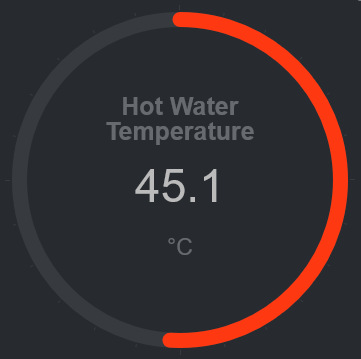
This is a chart that displays the hotwater temperature in the given range of 40 to 50.
<div data-netdata="stiebeleltron_system.hotwater.hotwatertemp"
data-title="Hot Water Temperature"
data-decimal-digits="1"
data-chart-library="easypiechart"
data-colors="#FE3912"
data-width="55%"
data-height="50%"
data-points="1200"
data-after="-1200"
data-dimensions="actual"
data-units="°C"
data-easypiechart-max-value="50"
data-easypiechart-min-value="40"
data-common-max="netdata-hotwater-max"
data-common-min="netdata-hotwater-min"
></div>
General
- Home
- Why netdata
- Installation
- Installation with docker
- Command Line Options
- Configuration
- Log Files
- Tracing Options
Running Netdata
Special Uses
-
netdata for IoT
lower netdata resource utilization -
high performance netdata
netdata public on the internet
Notes on memory management
-
Memory deduplication
half netdata memory requirements - netdata virtual memory size
Database Replication and Mirroring
- Replication Overview
-
monitoring ephemeral nodes
Use netdata to monitor auto-scaled cloud servers. -
netdata proxies
Streaming netdata metrics between netdata servers.
Backends
archiving netdata collected metrics to a time-series database
-
netdata-backends
graphite,opentsdb,kairosdb,influxdb,elasticsearch,blueflood - netdata with prometheus
- Walk Through: netdata with prometheus and grafana
Health monitoring - Alarms
alarms and alarm notifications in netdata
- Overview
-
Reference
reference for writing alarms -
Examples
simple how-to for writing alarms -
Notifications Configuration
- health API calls
- troubleshooting alarms
Netdata Registry
Monitoring Info
-
Monitoring web servers
The spectacles of a web server log file -
monitoring ephemeral containers
Use netdata to monitor auto-scaled containers. - monitoring systemd services
-
monitoring cgroups
Use netdata to monitor containers and virtual machines. -
monitoring IPMI
Use netdata to monitor enterprise server hardware - Monitoring disks
- Monitoring Go Applications
Netdata Badges
Data Collection
- Add more charts to netdata
- Internal Plugins
- External Plugins
-
statsd
netdata is a fully featured statsd server -
Third Party Plugins
netdata plugins distributed by third parties
Binary Modules
Python Modules
- How to write new module
- apache
- beanstalk
- bind_rndc
- ceph
- couchdb
- cpuidle
- cpufreq
- dns_query_time
- dovecot
- elasticsearch
- exim
- fail2ban
- freeradius
- go_expvar
- haproxy
- hddtemp
- httpcheck
- icecast
- ipfs
- isc_dhcpd
- litespeed
- mdstat
- megacli
- memcached
- mongodb
- mysql
- nginx
- nginx_plus
- nsd
- ntpd
- ovpn_status_log
- phpfpm
- portcheck
- postfix
- postgres
- powerdns
- puppet
- rabbitmq
- redis
- rethinkdbs
- retroshare
- sensors
- spigotmc
- springboot
- squid
- smartd_log
- tomcat
- traefik
- unbound
- varnish
- w1sensor
- web_log
Node.js Modules
BASH Modules
Active BASH Modules
Obsolete BASH Modules
- apache
- cpufreq
- cpu_apps
- exim
- hddtemp
- load_average
- mem_apps
- mysql
- nginx
- phpfpm
- postfix
- sensors
- squid
- tomcat
API Documentation
Web Dashboards
-
Learn how to create dashboards with charts from one or more netdata servers!
Running behind another web server
Package Maintainers
Donations
Blog
-
December, 2016
Linux console tools, fail to report per process CPU usage properly
-
April, 2016
You should install QoS on all your servers (Linux QoS for humans)
Monitor application bandwidth with Linux QoS (Good to do it, anyway)
Monitoring SYNPROXY (Linux TCP Anti-DDoS)
-
March, 2016
Article: Introducing netdata (the design principles of netdata)