-
Notifications
You must be signed in to change notification settings - Fork 1
IRC notifications
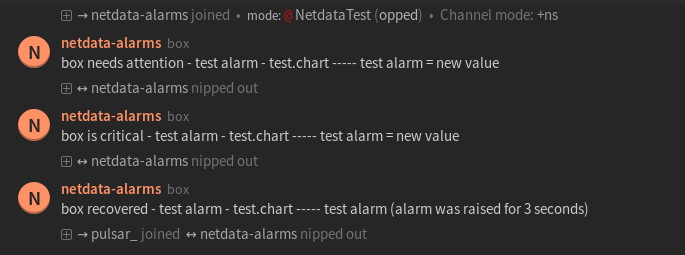
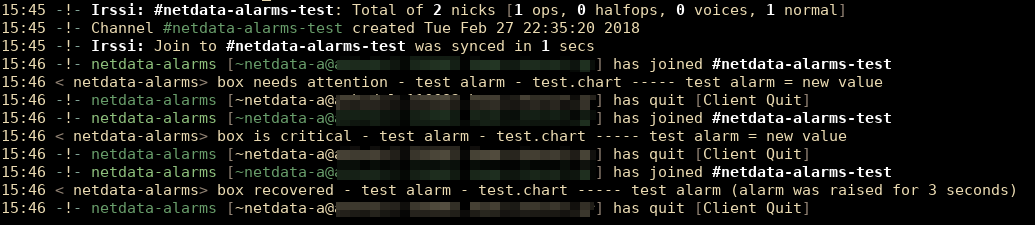
This is what you will get:
IRCCloud web client:
Irssi terminal client:
You need:
- The
ncutility. If you do not set the path, netdata will search for it in your system$PATH.
Set the path for nc in /etc/netdata/health_alarm_notify.conf (to edit it on your system run /etc/netdata/edit-config health_alarm_notify.conf), like this:
#------------------------------------------------------------------------------
# external commands
#
# The full path of the nc command.
# If empty, the system $PATH will be searched for it.
# If not found, irc notifications will be silently disabled.
nc="/usr/bin/nc"
- Αn
IRC_NETWORKto which your preffered channels belong to. - One or more channels (
DEFAULT_RECIPIENT_IRC) to post the messages to. - An
IRC_NICKNAMEand anIRC_REALNAMEto identify in IRC.
Set them in /etc/netdata/health_alarm_notify.conf (to edit it on your system run /etc/netdata/edit-config health_alarm_notify.conf), like this:
#------------------------------------------------------------------------------
# irc notification options
#
# irc notifications require only the nc utility to be installed.
# multiple recipients can be given like this:
# "<irc_channel_1> <irc_channel_2> ..."
# enable/disable sending irc notifications
SEND_IRC="YES"
# if a role's recipients are not configured, a notification will not be sent.
# (empty = do not send a notification for unconfigured roles):
DEFAULT_RECIPIENT_IRC="#system-alarms"
# The irc network to which the recipients belong. It must be the full network.
IRC_NETWORK="irc.freenode.net"
# The irc nickname which is required to send the notification. It must not be
# an already registered name as the connection's MODE is defined as a 'guest'.
IRC_NICKNAME="netdata-alarm-user"
# The irc realname which is required in order to make the connection and is an
# extra identifier.
IRC_REALNAME="netdata-user"
You can define multiple channels like this: #system-alarms #networking-alarms.
You can also filter the notifications like this: #system-alarms|critical.
You can give different channels per role using these (at the same file):
role_recipients_irc[sysadmin]="#user-alarms #networking-alarms #system-alarms"
role_recipients_irc[dba]="#databases-alarms"
role_recipients_irc[webmaster]="#networking-alarms"
The keywords #user-alarms, #networking-alarms, #system-alarms, #databases-alarms are irc channels which belong to the specified IRC network.
General
- Home
- Why netdata
- Installation
- Installation with docker
- Command Line Options
- Configuration
- Log Files
- Tracing Options
Running Netdata
Special Uses
-
netdata for IoT
lower netdata resource utilization -
high performance netdata
netdata public on the internet
Notes on memory management
-
Memory deduplication
half netdata memory requirements - netdata virtual memory size
Database Replication and Mirroring
- Replication Overview
-
monitoring ephemeral nodes
Use netdata to monitor auto-scaled cloud servers. -
netdata proxies
Streaming netdata metrics between netdata servers.
Backends
archiving netdata collected metrics to a time-series database
-
netdata-backends
graphite,opentsdb,kairosdb,influxdb,elasticsearch,blueflood - netdata with prometheus
- Walk Through: netdata with prometheus and grafana
Health monitoring - Alarms
alarms and alarm notifications in netdata
- Overview
-
Reference
reference for writing alarms -
Examples
simple how-to for writing alarms -
Notifications Configuration
- health API calls
- troubleshooting alarms
Netdata Registry
Monitoring Info
-
Monitoring web servers
The spectacles of a web server log file -
monitoring ephemeral containers
Use netdata to monitor auto-scaled containers. - monitoring systemd services
-
monitoring cgroups
Use netdata to monitor containers and virtual machines. -
monitoring IPMI
Use netdata to monitor enterprise server hardware - Monitoring disks
- Monitoring Go Applications
Netdata Badges
Data Collection
- Add more charts to netdata
- Internal Plugins
- External Plugins
-
statsd
netdata is a fully featured statsd server -
Third Party Plugins
netdata plugins distributed by third parties
Binary Modules
Python Modules
- How to write new module
- apache
- beanstalk
- bind_rndc
- ceph
- couchdb
- cpuidle
- cpufreq
- dns_query_time
- dovecot
- elasticsearch
- exim
- fail2ban
- freeradius
- go_expvar
- haproxy
- hddtemp
- httpcheck
- icecast
- ipfs
- isc_dhcpd
- litespeed
- mdstat
- megacli
- memcached
- mongodb
- mysql
- nginx
- nginx_plus
- nsd
- ntpd
- ovpn_status_log
- phpfpm
- portcheck
- postfix
- postgres
- powerdns
- puppet
- rabbitmq
- redis
- rethinkdbs
- retroshare
- sensors
- spigotmc
- springboot
- squid
- smartd_log
- tomcat
- traefik
- unbound
- varnish
- w1sensor
- web_log
Node.js Modules
BASH Modules
Active BASH Modules
Obsolete BASH Modules
- apache
- cpufreq
- cpu_apps
- exim
- hddtemp
- load_average
- mem_apps
- mysql
- nginx
- phpfpm
- postfix
- sensors
- squid
- tomcat
API Documentation
Web Dashboards
-
Learn how to create dashboards with charts from one or more netdata servers!
Running behind another web server
Package Maintainers
Donations
Blog
-
December, 2016
Linux console tools, fail to report per process CPU usage properly
-
April, 2016
You should install QoS on all your servers (Linux QoS for humans)
Monitor application bandwidth with Linux QoS (Good to do it, anyway)
Monitoring SYNPROXY (Linux TCP Anti-DDoS)
-
March, 2016
Article: Introducing netdata (the design principles of netdata)